The spool system offers a third access method for passing output data to the host spool system, "remote printing". In this access method, the SAP spool work process passes output data by way of a network link to the host spool in a UNIX system.
You can use any printer that is accessible from the host spool system, whether it is locally attached to the host or is accessed by means of host remote-printing facilities.
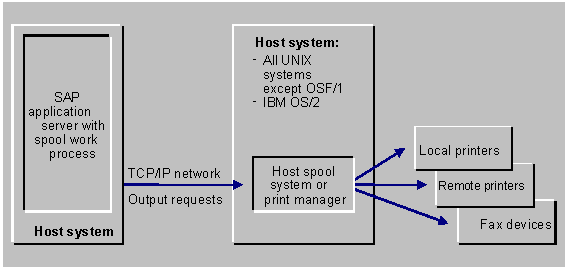
Important implementation considerations:
- Supported host systems
: This access method can be used with all LPD implementations (all UNIX implementations and the IBM OS/2 LPD implementation). However, only local printing is possible with OSF/1 systems. The OSF/1 spool system requires that the data sender run as the root account. However, the SAP System does not run as the root account.
- High reliability required
: This access method can lead to printing performance problems if the UNIX communication partner is not active when an output request is sent. The UNIX partner should always be available. The access method is therefore suitable only in companies that have the organization and staffing necessary to monitor their systems closely and ensure high availability.
If the UNIX partner is not active when an output request is sent to it, the spool server must wait for network time-outs to terminate the attempted communication. The spool server cannot process other output requests while it is waiting.
- Network printers
: You should not use this access method to print directly to a printer that is equipped with its own Ethernet or Token Ring card. The problem with this configuration is that the SAP spool server must restrict its transmission speed to that supported by the printer. If the printer does not have its own hard disk and you are not accessing it by way of a printer server, then data transmission to the printer can tie up the SAP spool server for considerable amounts of time.
Set Up Requirements: To implement remote printing, you must:
- Set up the printers on host systems meeting the high reliability requirements of this access method. (See the preceding notes.)
- Run an R/3 application server with the spool service on a host system of your choice. You can set up as many spool servers (application servers that offer the spool service) in your SAP System as you want.
- In each printer definition in the SAP spool system, specify the host system in which the spool server is running as the Spool server of the printer.
For the Access method, specify U (Print on LPDHOST using Berkeley protocol).
 For an example, see


 Implementing R/3 Remote Printing (UNIX Printers)