
 Defining the Web Server
Use
You must define the Web server to enable your workflow to receive XML messages (for example, XML response documents).
Prerequisites
The SAP Web Application Server (SAP Web AS) must be installed as well to enable your SAP System to react to XML documents and XML response documents appropriately.
Procedure
Choose Tools ®
Business Workflow ®
Development ®
Administration ®
Basic settings ®
WebFlow ®
Customizing Web server.
On the screen Customizing Web Server: Change, enter the address of your Web server and, if applicable, the port number.
Optionally, you can enter another service. As standard, the service is used when using the SAP Web AS.
If you want to test the WebFlow in your SAP System A and the starting of a Business Workflow in another SAP System B, you require the system architecture below:
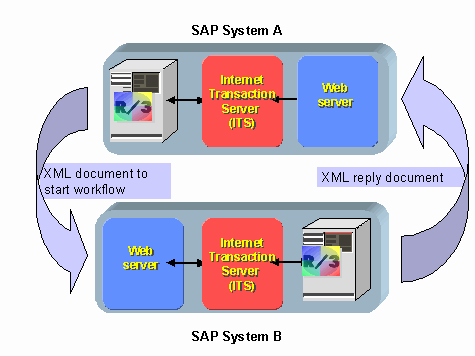

The SAP system B must access either a SAP Web AS or a SAP ITS.
To check the prerequisites for the test, execute the following steps:
- Check whether the release of the ITS installed on SAP System B is 4.6C or higher.
- If necessary, check if the
service WF_HANDLER is available on the SAP ITS of the SAP System B. The WORKFLOW_XML service must be available on the SAP Web AS.
The user used for the service logon must exist in the SAP System.
- When a SAP ITS is involved, this user is defined in the global service directory for the SAP ITS or in the service
WF_HANDLER. You can display the service in the Object Navigator (transaction SE80).
This user is defined in the basic data of the WORKFLOW_XML service for the SAP Web AS. You can display these by calling the  Maintenance of Services (transaction SICF) and by choosing the default_host ®
sap ®
bc ®
workflow_xml entry there by double-clicking.
Maintenance of Services (transaction SICF) and by choosing the default_host ®
sap ®
bc ®
workflow_xml entry there by double-clicking.
- The user defined must be authorized to store documents in the Business Document Service (BDS).
- The user defined in SAP System B must be one of the
possible agents of the workflow to be started.
Result
The URL required in a Web activity is created with the Web server defined here, as soon as the indicator Wait for feedback is set.