

 Evaluation and Maintenance of Type Linkages
Use
The type linkage describes the assignment of a
receiver function module and a receiver type to a particular combination of object type and event.A type linkage must be created if the system is always to react to an event of a particular object type. The type linkages are evaluated at runtime by the
event manager.The event receiver should define a type linkage using a function module provided.

If events are used in SAP Business Workflow (as triggering and terminating events, for wait steps), the entries required are made by the workflow system.
If you enter an event as a triggering event of a workflow, for example, the following entries are made automatically:
Integration
Transport and client copy
Type linkages are client-dependent and are written automatically into a Customizing transport request if the client is configured (in table
T000 ) for changes to be recorded automatically. All entries are then transported including activation indicators.In the case of client copy, you should ensure that the type linkages are copied into the target client, but are always deactivated in the target client.
The activation indicator of each individual type linkage is only copied with client copy if explicitly requested (parameter option for copying tables of class A).
Process Flow
The event manager begins the evaluation of the active type linkages when it is notified of the ID of a created event. For event handling to take place, either the event created and its triggering object type or the event created and a supertype of the triggering object type must be entered for the type linkage.
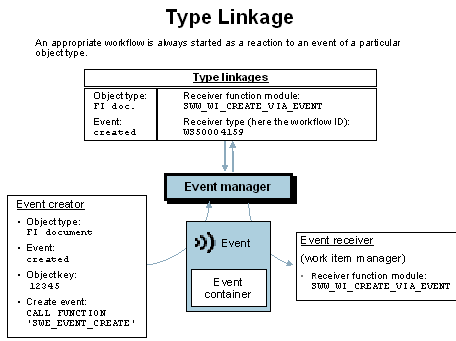
If the event manager finds a type linkage for the event created, the following processing steps take place:
If an error occurs within the function module
SWW_WI_CREATE_VIA_EVENT (task missing or has errors, problems with tRFC), a mail is sent to the workflow system administrator.Features
Type linkage data
The following fields are available in the type linkage table:
Object type and event must be defined in the Business Object Repository.
If this indicator is set, the type linkage is evaluated by the event manager.
This indicator is only evaluated if the event queue is active.
If the indicator is set, the event receiver is started via the event queue. If the indicator is not set or the event queue is not active, the receiver is started immediately.
The system presetting maintained on the tab page Basic data in event queue administration can be adopted or revised.
The status of the event receiver affects the starting of the receiver. In general, the receiver linkage must be active to start the receiver. The status of the receiver linkage has the following effects:
If the receiver linkage has the status no errors, the receivers are started by the system. They can be started directly or via the event queue.
If the receiver linkage has the status errors, the receiver is not started immediately, but is put into the event queue automatically instead. There the entry is assigned the status Waiting because of errors. So the receiver is not started, but there is an opportunity to start the receiver again after the error has been removed. Triggered events do not get lost even with linkages that have errors. The event receivers can be started again using the tab page Linkages with errors.
Type linkage maintenance
You have to define and process the type linkages manually if:
The maintenance of the type linkages within SAP Business Workflow is otherwise catered for by the workflow system.
You can create a type linkage using the following function module:
SWE_EVENT_REC_TYPE_ENTER
APIs are also available for processing individual fields of a type linkage.
Name of function module |
Explanation |
SWE_EVENT_REC_TYPE_CHECK_FB |
Changing the check function module for the event receiver |
SWE_EVENT_REC_TYPE_DISABLE |
Deactivating a type linkage |
SWE_EVENT_REC_TYPE_ENABLE |
Activating a type linkage |
SWE_EVENT_REC_TYPE_FB |
Changing the receiver function module |
SWE_EVENT_REC_TYPE_GET_FB |
Changing the receiver type function module |
SWE_EVENT_REC_TYPE_GLOBAL |
Setting a global event linkage |
SWE_EVENT_REC_TYPE_NOT_GLOBAL |
Deleting a global event linkage |
SWE_EVENT_REC_TYPE_READ |
Reading a type linkage |
Use the following function module to delete a type linkage:
SWE_EVENT_REC_TYPE_DELETE
If you create type linkages, ensure that you delete them again when they are no longer expected.
Activities
To maintain the type linkages, choose Tools ® Business Workflow ® Development ® Administration
® Event manager ® Type linkages.The overview displays the existing type linkages with details of object type, event and receiver type.
Choose Edit
® New entries to add new type linkages.Choose Goto
® Details to change type linkages.