

 Engineering Collaboration
Purpose
Engineering Collaboration makes direct integration of external and internal partners into a development process possible.
For product development numerous inter-
disciplinary tasks have to be managed. For example, theses include the determination of product requirements, selection of suitable development technologies or the coordination of development activities based on the division of labor. Very important, is that the employees of a requested organizational unit or external partners have the relevant knowledge and ability in order to fulfill the necessary tasks.Since the procurement of information is very time consuming, it is absolutely essential to communicate directly and informally with all those involved, whether they be employees, customers, suppliers or development partners. All partners require access to project information, documents and product data of all
types and must be in the position to make comments and changes.Features
mySAP.com enables project work to be carried out efficiently. With the workplace, you have a business orientated company portal, which, via an individual working environment on a web browser basis, provides the users with convenient access to everything that they require to complete their tasks.
Partners that want to work with the business scenario Collaborative Engineering only need a web browser. This gives you access to product and project data such as project plans, documents and product structures. The processing of project and product data can take place as a competition scenario or as a cooperation scenario.
Schedule of a Business Process
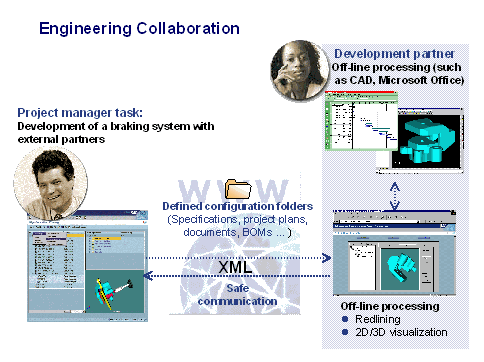
The following graphic illustrates a business process in which external partners are integrated into a development process. The following description of this business process illustrates how effectively the information and knowledge transfer takes place.
Cumulation of Data in the SAP System
The project manager (initiator) cumulates the project and product structures, relevant to the current business process, in a configuration folder.
Processing Data with the Web Browser
From the available information, each participant selects the data for which they responsible and saves it to their local hard drive.
Transfer of Data to the SAP System
If the processing is completed, the project participants report back to the SAP System
Internet server and move their changed data into the SAP System.Monitoring functions guarantee permanent project control for the entire duration of the project. At any time, the initiator can get an overview of the
current processing status of their project and product data. Without wasting any time, the initiator can send the successor folders with the changed data already received to a review.Documentation
Documentation on these functions can be found in the SAP library in the following documents:
Document |
In the SAP library, call up: |
Collaborative Engineering |
Logistics ® Project System ® Collaborative Engineering & Project Management (CEP) |
Configuration Management |
Logistics ® Project System ® Collaborative Engineering & Project Management (CEP) ® Folder creation in Configuration Management |