

 Buffers Monitor
Use
You can check the utilization of the and the hit rates and swap rates for the SAP buffers using this monitor. For a general introduction to this topic, see
 SAP buffers.
Features
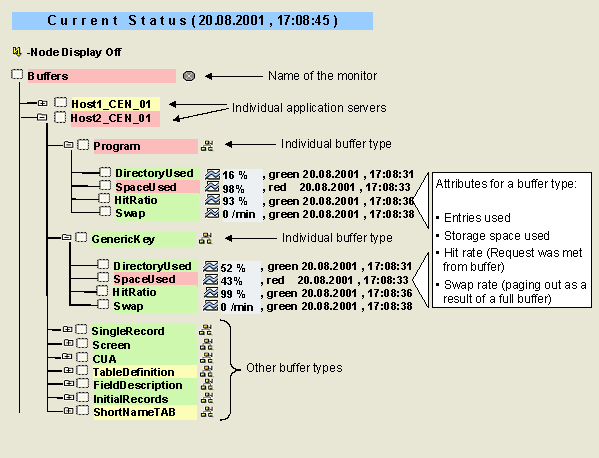
This monitor contains values for the following SAP buffers, sorted by application server:
|
Monitoring Tree Element |
Additional Names of the Buffer |
Contents of the Buffer |
|
Program |
ABAP buffer |
Compiled SAP programs |
|
GenericKey |
Wholly or partly buffered database tables |
|
|
SingleRecord |
Individual records from utilized database tables |
|
|
Screen |
Dynpro buffer |
Screen pages from ABAP programs |
|
CUA |
Menu buffer |
Menus and pushbuttons from ABAP screen pages |
|
TableDefinition |
TTAB buffer |
Table definitions from the SAP R/3 Repository |
|
FieldDescription |
FTAB buffer |
Field descriptions from the SAP R/3 Repository |
|
InitialRecords |
IREC buffer |
Initial record layout (initial values for the fields of a database segment) of a table |
|
ShortNameTAB |
SNTAB buffer |
Combination of the TTAB and FTAB buffers |
The monitor displays the following values for each buffer type:
|
Attribute |
Description |
|
DirectoryUsed |
Percentage usage of the directory (number of entries) |
|
SpaceUsed |
Percentage usage of the buffer storage |
|
HitRatio |
Percentage of the database queries that were met from the buffer (hit rate) and did not have to be passed on to the database |
|
Swap |
Swaps due to a full buffer per minute |
Activities
To start the monitor, follow the procedure below:
Procedure if Buffer Is Full or Swap Rate Is too High
SAP buffers use intelligent procedures to replace old buffered data with new requested data. Allocating too much space to a buffer can also lead to other problems (operating system paging) without significantly increasing the hit rate (buffer quality).
The goal of the buffer setting is therefore to have a sufficiently large buffer to maintain a high rate, and to do so with a low swap rate and a minimal effect on operating system paging.
Here are a few guidelines about when certain SAP buffers must be increased in size:
Procedure if Hit Rate Is Too Low
Hit rate alerts indicate that bad buffer performance is damaging the performance of the application server. As the buffer is of great importance for good system performance, you should investigate the
buffer quality problem in great detail and take corrective measures.
In general, bad buffer quality means that the buffer is too small. If a buffer is too small, it is more likely that requested objects (such as table entries or programs) are not found in the buffer. This leads to a lower hit rate, and, if the buffer is already full, to increased swapping. The more often requested objects replace older objects in the buffer, the more swapping takes place.
To improve the hit rate, you should increase the size of the buffer. You should ensure, however, that the buffer quality has not been reduced by a temporary problem: after a system or application server is started, all buffers perform badly, as the buffers must first be filled. The default setting for the monitoring architecture is therefore not to trigger any buffer alerts during the first 20 minutes of operation.
The performance of a program buffer can also be reduced if developers are working in the system or if objects are imported into the system using the SAP R/3 transport system.

With the exception of the SingleRecord buffer, the hit rate for buffers should always be above 95 percent if the buffers are large enough. The performance of the SingleRecord buffer can be regarded as good if the hit rate is between 80 and 90 percent.
Increasing the Size of SAP Buffers
To increase the size of a buffer, change the system profile parameters that specify the size of the buffer. For some buffers, you can set the size of the buffer and the maximum number of entries in separate parameters. For other buffers, there is only a size parameter, and the system automatically calculates the required system parameters.
|
Name of the Buffer |
Responsible System Parameters |
Typical Size/Number of Entries |
|
Program |
Size: abap/buffersize [KB] |
240,000–400,000 KB |
|
GenericKey |
Size: zcsa/table_buffer_area [Bytes] |
50 MB |
|
SingleRecord |
Size: rtbb/buffer_length [KB] |
30,000 KB |
|
Screen |
Size: zcsa/presentation_buffer_area [Bytes] |
150–200 MB |
|
CUA |
Size: rsdb/cua/buffersize [KB] |
3,000-6,000 KB |
|
TableDefinition |
Size is determined by the number of entries |
30,000 entries |
|
FieldDescription |
Size: rsdb/ntab/ftabsize [KB] |
20,000-30,000 KB |
|
InitialRecords |
Size: rsdb/ntab/irbdsize [KB] |
4,000 KB |
|
ShortNameTAB |
Size: rsdb/ntab/sntabsize [KB] |
2,500 KB |
For more information about setting buffer sizes, see
Typical Parameter Settings for SAP Buffers. See also SAP Note 0103747.It is often not possible to set the size of a buffer so that it never becomes full. Above a certain size, which is greatly dependent on the hardware and the operating system, the performance advantage of the buffer is canceled out by increased operating system paging. A buffer that occupies too much main memory forces the operating system to perform expensive paging.
The goal of buffer management is to assign the buffers enough memory so that they achieve a high hit rate with low swap rates, without causing much operating system paging. After each change of the buffer size, you should monitor paging and memory usage to ensure that the new buffer size does not cause any other performance problems.
As a rule of thumb, we recommend that you assign space to the SAP buffers rather than the database buffers, if main memory becomes limited. In SAP R/3 Systems, every application server has its own buffer. These buffers should not be confused with the buffers of the SAP R/3 database system.