

 Implementing the Extended Memory Under Windows
Implementation with Map/Unmap
Here, a roll-in corresponds to mapping a context in the extended memory, and a roll-out corresponds to unmapping. There is an identical implementation on Linux (see
Memory Management under Linux).The following graphic displays two work processes that are accessing a common resource.
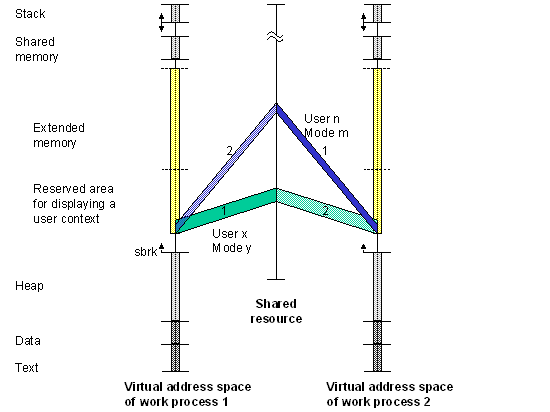
The common resource (memory mapped file) contains all the user contexts. The extended memory of a work process contains an area reserved for mapping the current user context.
The graphic displays a context change or transfer: First, the context for user X, mode Y is mapped in the extended memory of work process 1. The work process processes an inquiry of this context. Analogous to this, the context from user N, mode M is mapped in the reserved area of work process 2 (marked with a 1). After processing, both work processes "put" the (changed) context back in the common resource by making the context visible again.
Then work process 1 can process the context for user N, mode M and work process 2 can process the context from user X, mode Y (marked with a 2).
The start address for the mapped context is always the same.