

 BCS Key Figures
Definition
Aggregation of posting data for evaluation purposes or processing functions in the budget control system.
Use
You can use key figures for a range of functions in the budget control system. They can be used in one or a number of the following categories:
|
Category |
Use |
|
Consistency check |
for the key figures used in the check rules of the check library |
|
Year end |
in closing operations for calculating residual budget for the carryforward of budget data to the following year |
|
Display in budgeting workbench |
for information evaluation in the budgeting workbench in the form of additional line item columns |
|
Display in reporting |
for reporting purposes with the reporting tool in BCS You start the reporting tool in the Funds Management menu under Budgeting ® Budget Control System(BCS) ® Tools ® Evaluation According to Key Figures For more information, see the report documentation |
|
Individual budget types for consumption |
for specific US Federal Government functions |
|
Transfer posting |
for transfer postings of budget between budget types |
Standard Delivery and Customer-Defined Key Figures
SAP provides a range of key figures that you can use in your FM area. You can use these key figures as templates for defining customer-specific key figures or define your own without using templates.

The use of customer-defined key figures is restricted for the category Year End. SAP delivers predefined key figures for this category. You must use the key figures provided by SAP as a template if you want to use customer-defined key figures. Changes are only possible in budget data term not in actual term.
Structure
The following diagram displays how a key figure is defined in the budget control system. A key figure is made up of the summation of posting data of particular data sources.
Key Figure for Calculating Residual Budget
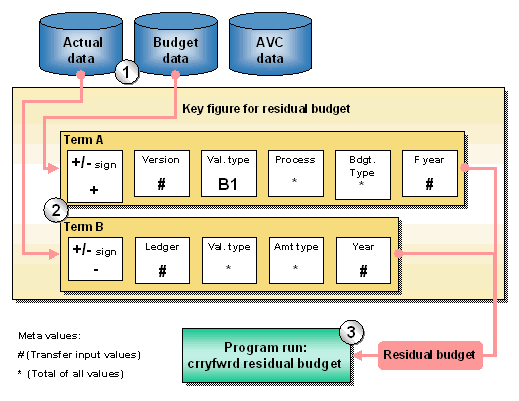
In the example: data from the actual database and the budget database is read for the calculation of residual budget.
In the example: the residual budget is calculated from the total available budget (term A) minus the actual data (term B).
In the example: for the calculation of the residual budget, the data affected such as the fiscal year, the category and the version is copied from the entries for the program run Carryforward Residual Budget.