QM-STI Evaluations
Use
You use this function to export QM results data to the QM-STI Interface for evaluation by an external statistics system. You can export the results data from the following areas in QM:
In results recording you can start an STI evaluation for the current characteristic via Extras
From a quality control chart, you can start an evaluation by choosing QM-STI evaluation from the menu options. You reach the dialog box mentioned above. All samples that were read for the control chart are transferred to the QM-STI Interface, except those from canceled inspection lots. This means that samples that were not evaluated and samples or characteristics that were not completed are not transferred to the interface.
From a results history screen, the data of a characteristic from multiple inspection lots is exported to the QM-STI evaluations. The samples are exported according to the sort method selected.
Prerequisites
At least one evaluation method must be defined in Customizing for QM under Quality Management
® Information System ® Inspection Lot: Data Summarization in QM Info System ® Define evaluation methods for the QM-STI Interface.
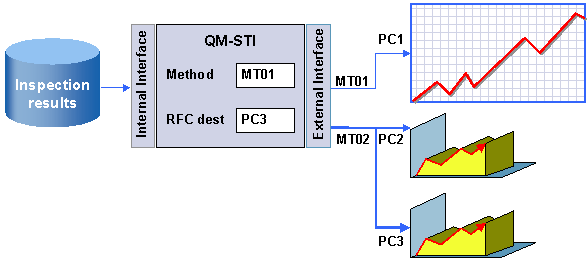
This graphic shows the integration of QM-STI evaluations in results recording. From a menu path, a dialog box is called which allows you to select the evaluation method and the RFC destination. The RFC destination specifies on which PC and with which program the evaluation will take place.