

 Monitoring of the Maximum Permitted Storage Period
Use
This function helps you to monitor from disposal processing whether the maximum storage periods for
wastes are being kept to.Prerequisites
The entry document contains the following data:

If you enter a waste and a
 plant in the Disp. proc. plt field when you create or change an entry document, the system proposes the value specified for the plant in the Max. storage field in the waste material master as the maximum permitted storage period. You can change this value in the detail view of the entry document.
The default value for the maximum permitted storage period is not updated. This means that if you enter a different storage period in the material master or if you enter another plant for which a different storage period has been entered in the material master, this different storage period is not automatically reread and adopted.
Features
The system displays whether the maximum storage period is being kept to for each entry document in the Max. stor. field in the document overview in disposal processing as follows:
 : Maximum storage period is not exceeded.
 : Maximum storage period is not exceeded, but current date is within the alert period.
 : Maximum storage period is exceeded.
The icon that is displayed for an entry document is redetermined using the current date each time you access disposal processing. Depending on whether this date is before or after the end of the maximum storage period, the system displays the icons as follows:
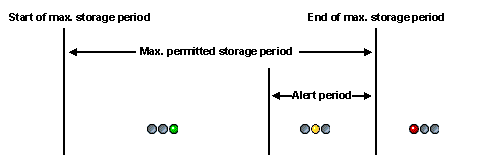
The start of the maximum storage period is determined as follows:
The end of the maximum storage period is calculated from the start of the maximum storage period and the maximum permitted storage period from the entry document. You can specify the alert period in the Alert period field in the
entry tool.