 Business Partner Conversion
Guidelines for Converting the Treasury / Real Estate Business Partner to the SAP Business Partner
Purpose
In order to provide centralized business partner management across all applications, SAP is introducing the SAP Business Partner. This involves replacing the Treasury Business Partner with the SAP Business Partner.
The
component  SAP
Business Partner for Financial Services enables you to create and manage
business partners centrally, across the various applications. It is designed
to minimize data redundancy and exploit the advantages of data integration. It
also focuses more strongly on managing customer relationships and new customer
acquisitions.
SAP
Business Partner for Financial Services enables you to create and manage
business partners centrally, across the various applications. It is designed
to minimize data redundancy and exploit the advantages of data integration. It
also focuses more strongly on managing customer relationships and new customer
acquisitions.

For information on the concept and use of the SAP Business Partner, see the documentation under Accounting ->Corporate Finance Management -> SAP Business Partner for Financial Services.
Individual application components are spread across a heterogeneous system infrastructure, and are linked to the Treasury Business Partner at different levels of complexity. It is therefore not possible to convert all applications to the SAP Business Partner at the same time, or for the same Release. The Treasury Business Partner is therefore converted to the SAP Business Partner in two phases.
Relevant Releases
|
|
SAP R/3 Enterprise
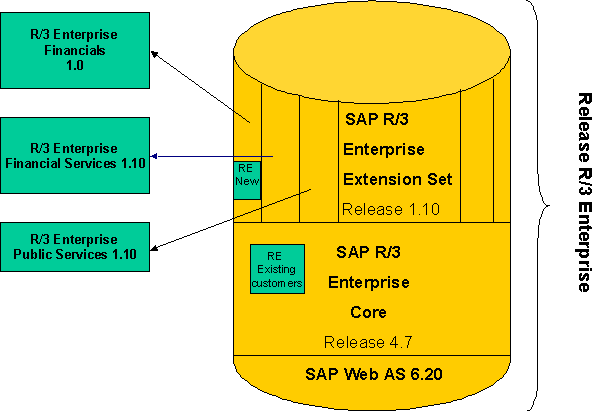
These guidelines provide information on the procedures involved in both phases of the conversion from the Treasury Business Partner to the SAP Business Partner. A detailed description of the report programs you need to run and the relevant tables and attributes for both phases is available.
Implementation Considerations
Whether or not you need to convert from the Treasury Business Partner to the SAP Business Partner depends on certain conditions:
· You must convert from the Treasury Business Partner to the SAP Business Partner if you use either the Banking or CFM applications. Until now, these applications worked with the Treasury Business Partner.
· You do not need to carry out the conversion if, in the upgrade to Release Banking 4.62/CFM 1.0, you use the components Real Estate Management (RE) and Loans Management (CML), which continue to use the Treasury Business Partner, but do not use Corporate Finance Management (CFM). You can still convert the data and activate parallel maintenance, however.
· If you upgrade to Release Banking 4.63/CFM2.0 or higher, you must carry out both conversion phase I and II. Only after you have successfully carried out both phases of the conversion can you begin to process business partner data, however.
· Likewise, you do not need to carry out the conversion if, from Release Banking 3/CFM 1.0, you only use Real Estate Management (RE), which continues to use the Treasury Business Partner, and do not use Corporate Finance Management (CFM) or Loans Management (CML). You could still convert the data and activate parallel maintenance, however.

Code conversion of the DDIC references takes place in phase II. This only affects user-defined tables and tables you have generated yourself. The Real Estate tables are therefore not affected by the code conversion. Note, however, that the Treasury Business Partner number must be converted to the SAP Business Partner Number.
· If you use Real Estate Management as well as other applications that use the SAP Business Partner after Release Banking 4.63/CFM 2.0, you have to carry out the business partner conversion (phase I).
Code conversion of the DDIC references tales place in phase II. This only affects user-defined tables and tables you have generated yourself. The Real Estate tables are therefore not affected by the code conversion. Note, however, that the Treasury Business Partner number must be converted to the SAP Business Partner Number.
· If you are a new customer and are implementing Release Banking 4.63/CFM 2.0 for the first time, you do not need to carry out either phase I or phase II of the conversion. You can activate parallel maintenance, however. If you install Release Banking 4.62/CFM 1.0, you have to activate parallel maintenance. You can deactivate parallel maintenance as of Release Banking 4.63/CFM 2.0, if required In each case, you must ensure that the indicators have been set correctly in Customizing, under SAP Business Partner for Financial Services -> Settings for Conversion and Parallel Maintenance of TR BP and SAP BP -> Conversion: Phase I -> Activate Parallel Maintenance. For more information, see Activating Parallel Maintenance.
· If you have used the Treasury Business Partner from Release R/3 Enterprise Financial Services 1.10 and convert to the SAP Business Partner, you have to run two additional reports after you have carried out the conversion (phase I). You will find further information under Business Partner Conversion (Phase I).
The following chart provides you with information on where the Treasury Business Partner and the SAP Business Partner are used:
|
Release |
Treasury Business Partner |
SAP Business Partner |
|
4.6C Core |
Treasury (TR) |
|
|
|
Real Estate Management (RE) |
|
|
|
Statutory Reporting for Insurance (IS-IS-SR) |
|
|
Banking 4.61 |
Treasury (TR) |
Bank Customer Accounts (IS-B-BCA) |
|
|
Real Estate Management (RE) |
|
|
|
SAP Banking (IS-B) · Profitability Analysis (IS-B-PA) · Risk Analysis (IS-B-RA) |
|
|
Banking 4.62/CFM 1.0 |
Real Estate Management (RE) |
Corporate Finance Management (CFM) |
|
|
Loans Management (CML) |
Bank Customer Accounts (IS-B-BCA) |
|
|
SAP Banking (IS-B) - Profitability Analysis (IS-B-PA) |
SAP Banking (IS-B) - Risk Analysis (IS-B-RA) |
|
Banking 4.63/CFM 2.0 |
|
Loans Management (CML) converts to the SAP Business Partner |
From Release Banking 4.63/CFM 2.0 the Treasury Business Partner is renamed the Real Estate Business Partner, as it is only used in Real Estate Management (RE).
Features
The Treasury Business Partner is replaced the SAP Business Partner in two phases, for the reasons mentioned above:
Phase I:
In phase I some applications will use the SAP Business Partner while others continue to use the Treasury Business Partner.
This phase begins with the upgrade to Release Banking 4.62/CFM 1.0 or higher. After the upgrade you carry out the business partner conversion (phase I), depending on your requirements (see Implementation Considerations). This is divided into several large blocks, for which the following steps are necessary:
...
1. You have to build the Customizing for the SAP Business Partner and the conversion Customizing between the Treasury Business Partner and the SAP Business Partner.
2. You have to create SAP Business Partners from the existing Treasury Business Partners.
3. If SAP Business Partners already existed in your system before you converted the Treasury Business Partner, it may be necessary to run the reconciliation report to delete any duplicate entries.
4. Depending on the requirements (see Implementation Considerations) you have to set an indicator to activate parallel maintenance. When an SAP Business Partner is updated, the system also updates a Treasury Business Partner in the background. Likewise, when a Treasury Business Partner is updated, an SAP Business Partner is updated in the background. Both business partners are managed in parallel (parallel phase).
..
You have to build the Customizing for the SAP Business Partner and the conversion Customizing between the Treasury Business Partner and the SAP Business Partner.
You have to create SAP Business Partners from the existing Treasury Business Partners.
If SAP Business Partners already existed in your system before you converted the Treasury Business Partner, it may be necessary to run the reconciliation report to delete any duplicate entries.
Depending on the requirements (see Implementation Considerations) you have to set an indicator to activate parallel maintenance. When an SAP Business Partner is updated, the system also updates a Treasury Business Partner in the background. Likewise, when the Treasury Business Partner is updated, an SAP Business Partner is updated in the background. Both business partners are managed in parallel (parallel phase).
The
same logic applies for the transfer of external data for the SAP Business
Partner as applies for the processing of business partners online. When an SAP
Business Partner is transferred (transfer category 15) a Treasury Business
Partner is automatically created. Likewise, when a Treasury Business Partner
is transferred (transfer category 14) an SAP Business Partner is automatically
created. During the parallel maintenance phase you cannot
use Business Application Programming Interfaces (BAPIs) to transfer data. You
can transfer business partners using external data transfer or the direct
input module FSBP_DARK_MAINTAIN_INTERN. You
will find detailed information on the business partner conversion in phase I,
and the report programs you need to run, under Business Partner
Conversion (Phase I). If you
carry out an upgrade to Release Banking 4.63/CFM 2.0 or higher, phase
II follows on directly from phase I. Phase II This
phase begins with the upgrade to Release Banking 4.63/CFM 2.0.
In this phase, the Treasury Business Partner should not be used by any
Financial Services application (Loans Management (CML) and Corporate
Finance Management (CFM)). Except for Real Estate Management (RE),
all applications use only the SAP Business Partner. Unlike
the other applications, Real Estate Management (RE) forms part of the
R/3 Core delivery. As conversion to the SAP Business Partner takes place in an
Add-on to the core, it is not possible to convert Real Estate Management
(RE) at the same time. Setting up phase II involves two steps:
1.
You have to
convert the DDIC references for all the fields in the tables and structures
that refer to data elements and domains belonging to the Treasury Business
Partner, except for real estate tables, to the corresponding data elements and
domains for the SAP Business Partner. However, this only functions
automatically for tables and structures delivered by SAP. If you have defined
tables and structures as customer developments or generated customer tables
using SAP applications, you can use tools delivered by SAP to make the DDIC
adjustments yourself. With customer developments, you should therefore ensure
that you make logical assignments between tables that belong to Corporate
Finance Management and Real Estate Management.
2.
You have to
replace the field values in tables that previously referenced the Treasury
Business Partner with the corresponding field values of the SAP Business
Partner.
...
You have to convert the
DDIC references for all the fields in the tables and structures that refer to
data elements and domains belonging to the Treasury Business Partner, except
for real estate tables, to the corresponding data elements and domains for the
SAP Business Partner. However, this only functions automatically for
tables and structures delivered by SAP. If you have defined tables and
structures as customer developments or generated customer tables using SAP
applications, you can use tools delivered by SAP to make the DDIC adjustments
yourself. With customer developments, you should therefore ensure that you
make logical assignments between tables that belong to Corporate Finance
Management and Real Estate Management.
You have to replace the
field values in tables that previously referenced the Treasury Business
Partner with the corresponding field values of the SAP Business Partner (code
conversion). In
order to carry out these steps, you must have successfully carried out the Business Partner
Conversion (Phase I). If you have already introduced identical numbers in
phase I, you do not need to convert the partner number. As
Real Estate Management (RE) continues to use the Treasury Business
Partner, and Real Estate Management (RE) and Loans Management
(CML) use shared tables, identical numbers for the SAP Business
Partner and the Treasury Business Partner are required from phase II. If you
set different numbers for the SAP BP and the TR BP in phase I, you must
use the conversion routines to create corresponding numbers. These conversion
routines also convert the references in the Treasury Business Partner tables
themselves. This procedure applies in particular for Real Estate Management
(RE) customers who have imported the CFM/Banking Add-On, in order
to use Real Estate Management (RE) and CFM/Banking in
parallel. You
will find detailed information on the business partner conversion in phase II
and the report programs you need to run under Business Partner Code
Conversion (Phase II). When you have successfully
completed phase II, you have finished converting the Treasury Business Partner
to the SAP Business Partner. Due to the different
requirements that customers may have, business partner conversion, DDIC
adjustment and code conversion cannot be run automatically using XPRAs (report
programs that run automatically during an upgrade). You
should read all the documentation for these components before you begin the
business partner conversion. Refer to composite SAP Note 398888 on the
business partner conversion (see also Important
Information). If you are using Release Banking 4.63/CFM 2.0 with
support package status below 14, check the relevance of the SAP Notes
contained in the composite SAP Note (program corrections).
