

 Assignment of Business Area and Partner Business Area
Use
Prerequisite for reports about business areas is, that all FS items of financial statements and income statements, for which the business area has responsibility, are to be supplied with the business area account assignment. This is in particular the FS items of the transferred assets, the receivables and payables, the material stocks, as well as all FS items of the income statement.
In addition to that for business area consolidations, it is necessary that the postings, which originate from group-internal business relationships, are supplied with the trading partner business area.
Therefore the operational postings to the accounts which are relevant for business areas, have to contain business area account assignments and trading partner account assignments.
Features
Account Assignment of Business Area
It depends on the business transaction, how the business area is assigned in the operational postings. Fundamentally there are two possibilities: The system can either derive the business area automatically from master records of the concerned account assignment objects, or the administrator has to enter the business area manually.
You will find detailed explanations at
 FI Business Area (SAP Library).
The following table explains the account assignment of the business area (BA) in an overview. The table is divided according to the components in which the accounting document occurs. Per component you will be able to go to the detailed FI documentation on the business area.
SAP components |
Autom. derivation? |
Manual Entry? |
FI-Documentation |
G/L accounting |
When you enter a CO account assignment object, then the system can derive the BA from its master record. |
always necessary when no derivation from CO account assignment object occurs |
BA in General Ledger Accounting |
Asset accounting |
from master record of the asset |
not necessary |
BA in Asset Accounting |
Accounts receivable / payable accounting |
from one or more business areas for G/L account offsetting entries When several BAs are assigned in offsetting entries, then you have to readjust the BA in the reconciliation account (see below). |
not necessary |
BA in Accounts Receivable/Accounts Payable |
Controlling |
from master record of the CO account assignment object |
not necessary |
BA in Controlling |
Materials management |
from the BA assignment for material, in fact per combination of division and plant |
not necessary |
BA in Materials Management |
Sales |
Derivation rule per sales area (IMG): either BA assignment for each plant/division or each sales area |
not necessary |

In the IMG of Consolidation, section Preparations in the Sender System ® Further Settings for Business Area Consolidation, steps from the operational applications are compiled, which are to be executed for the account assignment of the business area. The compilation was intended as a checklist from a Consolidation point of view.
Assignment of Trading Partner Business Area
As with assigning the business area, it depends on the business transaction, as to how the trading partner business area is assigned. Fundamentally there are two possibilities: The system can either set the trading partner business area "diagonally", or the administrator has to enter the trading partner business area manually.
"Diagonal" Derivation of the Trading Partner Business Area
With the business transactions of materials procurement and sales, the system can automatically derive the trading partner business area. Prerequisite for this is that the delivering and receiving partner set the SAP components Materials Management and Sales in the same SAP System and in the same client.
Process Flow:
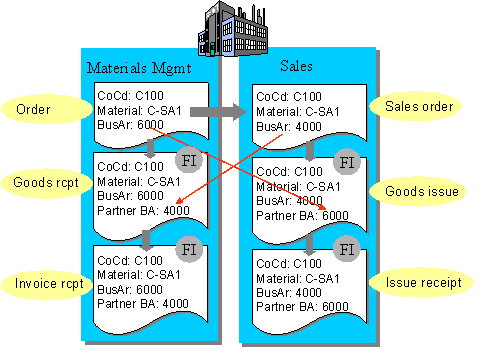
Customizing:
In the IMG the companies have to identify the same clients to enable the automatic derivation of the trading partner business area.
When Materials Management and Sales of group-internal business partners do not work in the same system and in the same client, then you can bring about the automatic assignment of the trading partner business area via the substitution rule. For example you define the rule that on delivery of material C-SA1 from plant 1, trading partner business area 6000 is assigned.
Manual Entry of Trading Partner Business Area
When you enter in accounts receivable/payable accounting, then you enter the trading partner business area in the document header or in the G/L account. The trading partner business area is not passed on to the current line (also not when it is clear in the document). Therefore it must be readjusted to the reconciliation account Receivables or Payables (see below).
To enter the trading partner business area, the administrator must have the information which business area is concerned with the group-internal business partner. You have to organize this flow of information.
Adjustment of Balance Sheet and Income Statement with Business Areas and Trading Partner Business Areas
Business Area Adjustment
The adjustment of business areas is always necessary when you want to create a business area balance sheet / income statement in financial accounting. In addition to that it is also necessary for business area consolidations.
You execute the adjustment in the G/L accounting (menu Periodic Work) in fact for the following reasons:
The adjustment program distributes the business area account assignment from the offsetting accounts to the accounts to be adjusted.
In the menu Period Work there is an adjustment program for the balance sheet account and an adjustment program for the income statement accounts. You will find detailed information in the FI documentation
Generating Business Area Financial Statements (SAP Library).
The adjustment can not be carried out at any time, rather it must take place after the evaluation of open items. After that you are not allowed to carry out any more postings to business areas.

The following example explains the adjustment of business areas to the reconciliation accounts Receivables, with the help of a simple posting example. Tax postings are disregarded.
Example A
A customer invoice is created in which the sales revenue is assigned to a business area.
Invoice
Account |
Business area |
Amount |
Customer / receivable |
6000 (passed on as offsetting entry) |
1,000.00 |
Revenues |
6000 |
1,000.00- |
As the business area is clear in the document, the system can pass on the business area account assignment from the G/L account line to the current line and with it to the reconciliation account Receivables. Therefore no adjustment is necessary for this posting.
Example B
A customer invoice is created in which the sales revenue is assigned to several business areas.
Invoice
Account |
Business area |
Amount |
Customer / receivable |
1,000.00 | |
Revenues |
5000 |
600.00- |
Revenues |
6000 |
400.00- |
The system does not pass on the business area to the current line. Otherwise the customer posting would be excessively large. It is important that the receivable is divided into the business areas. You achieve this with the adjustment program.
Adjustment
Adjustment account |
Business area |
Amount |
Receivables |
1,000.00- | |
Receivables |
5000 |
600.00 |
Receivables |
6000 |
400.00 |
The adjustment program writes off the amount of 1,000.00 to the adjustment account for the receivable without the business area account assignment and with stock allocation to the business areas again.
Receivables account and adjustment account must be assigned the same FS item from the financial statement version as well as the same consolidation item.
Trading Partner Business Area Adjustment
When you have activated the data transfer for business area consolidation in Customizing, then the adjustment program also assigns the trading partner business area to the accounts to be adjusted.
Invoice
Account |
Business area |
Trading partner BA |
Amount |
Customer / receivable |
6000 (passed on as offsetting entry) |
1,000.00 | |
Revenues |
6000 |
4000 |
1,000.00- |
As the business area is clear in the document, the system passes it on from the G/L account line to the current line and with it to the reconciliation account Receivables. However the system does not generally pass on the business area to the current line. Therefore the trading partner business area must also be adjusted.
Adjustment
Adjustment account |
Business area |
Trading partner BA |
Amount |
Receivables |
6000 |
1.000,00- | |
Receivables |
6000 |
4000 |
1.000,00 |
The adjustment program writes off the amount of 1,000.00 to the adjustment account for the receivable without the business area account assignment and with the business areas again.
Activities from the Consolidation Point of View
The execution of the adjustment is not the Consolidation administrator’s responsibility, instead it is the responsibility of the G/L accounting.
However as the person responsible for the data transfer to Consolidation, you should check whether the adjustment program was executed, so that the data, which you transfer to Consolidation, had the necessary business area account assignments.