

 Filtering
Use
To execute the distribution of an object list in the best possible runtime, the UPS determines the delta internally. Only the objects (object statuses) that have not yet been correctly transferred to the target system by previous distributions are distributed. The replication table logs each distribution of an object using UPS. Filtering uses this object granularity.
Because of the large amount of data expected, the logical replication table can be distributed across several database tables. The standard UPS contains a predefined replication table, UPSREP01. This serves as a template for customer-specific replication tables, and is always used if no customer-specific table is entered for a new target system. The distribution to several database tables uses Customizing table TUPS05. Here, a logical system number in a database table is assigned to target system.

Integration
If an object list is transferred to UPS for distribution using an API, the system first determines the deltas, to reduce the amount of objects actually transferred to this system as much as possible. There are five steps to the filtering process:
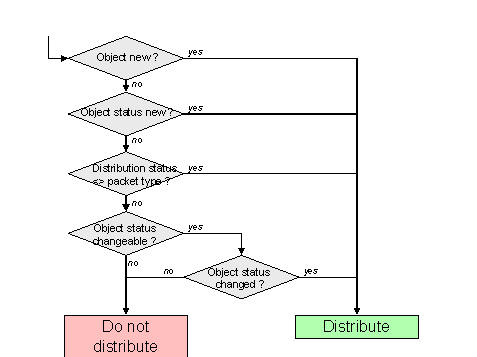
The filtering process uses the following criteria:
|
Filter Criterion |
Description |
|
1. Object new? |
If there is no entry with an identical object key in the replication table, the object is new. |
|
2. Object status new? |
If there are entries with an identical object key, but with different validity (date or change number), the object status is new. |
|
3. Distribution status <> packet type? |
In Customizing for the UPS, under Define Packet Type, you define which distribution status objects must have to be filtered out. |
|
4. Object status changeable? |
If the object status has not been changeable since the last distribution, the object status is certain in the target system and can be filtered out. |
|
5. Object status changed? |
If the object status could be changed since the last distribution, the system checks whether is was changed, using the last change date. If it was not, it can be filtered out. |
For objects that were entered in UPS dialog, there is no check against the replication table, because explicit naming by the user has a higher priority.
When IDocs are set up by UPS in the source system, a new record is created in the replication table for each distributed object, or the existing record is updated. The following information is included:
If the object is posted to the target system and the UPS finishes with Posted status, the
confirmation mechanism updates the replication table for all objects posted with the UPS to status P. Status P shows that the objects have been posted. If the ALE distribution unit of the UPS is rejected by the target system, or an object is deleted from the ALE distribution unit, the replication table is not updated.Prerequisites
In Customizing for the UPS, under Define Packet Type, you define which distribution status an object must have to be filtered out.
In Customizing for the UPS, under Define Object Type, you assign service object changes to an object type. This service determines the date of the last change to a specific object or whether it is changeable.
Features
The following reports are available for analyzing the replication table:
|
Report |
Description |
|
UPSREP02 |
For a specific target system, the contents of the replication table are displayed. This makes it easier to examine why an object has been filtered out or not. |
|
UPSREP05 |
The load distribution of the individual database table in the replication table is displayed. In a detail view, the volume distribution per database table per target system is displayed. |