

 Terms of Payment (Accounts Payable)
Use
The terms of payment key can determine the following:

If you have maintained a key for the terms of payment in the vendor master record, the system automatically defaults this key whenever you enter an item for this vendor.
The following description applies to individual payments. For more information on the terms of payment for installment payments, see
Terms of Payment for Installment Payments (Accounts Payable)Features
You can enter the terms of payment in the field Days/Perc. manually (maximum of two levels of cash discount and the due date for net payment with a certain number of days). You can also enter up to three decimal places for the cash discount percentage (for example, 2.125 for two and one-eighth percent discount).

For example, to enter terms of payment of "2/10 Net 30", enter 10 (for ten days) and 2 (for two percent) in the first two fields.
Activities
Enter the amount on which the cash discount is based in the Disc.Base field. This amount does not have to be equal to the amount of the line item. If you leave the Disc.Base field blank, the system calculates the cash discount basis based on:
The Disc. Amount field enables you to enter the cash discount directly, overriding the system's calculation of the cash discount.
After you enter the line item and display it, you see the message Cash discount basis is calculated. The system calculates the cash discount when you post the document.
The following figure illustrates the relationship between posting date, terms of payment, cash discount, and due date.
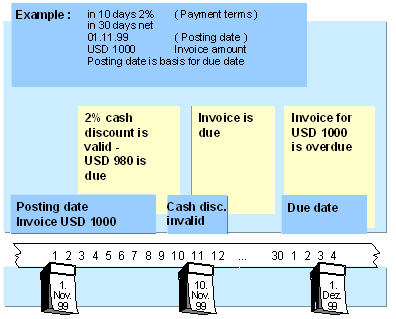
You can enter G/L account line items without cash discount. For example, assume you receive an invoice for goods and shipping. Cash discount is valid for the goods, but not for the shipping. In this case, enter a separate G/L line item for the shipping and select the field W/o Cash Discount. The calculated cash discount basis is the total of all G/L account line items where the field W/o cash discount is not selected.