

 Workload Collector Monitor
Use
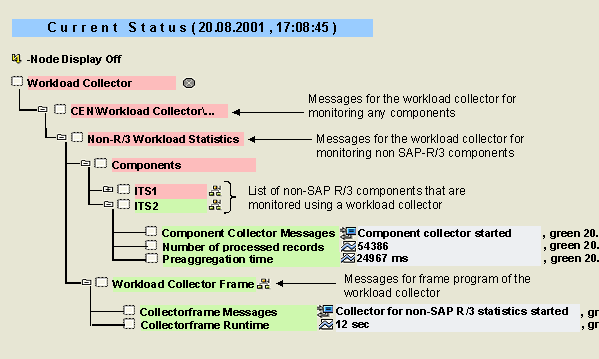
You can use the Workload Collector monitor to monitor the workload collectors for components with no underlying SAP R/3 System. These collectors allow an exact analysis of the workload of non-SAP R/3 Systems in the same way as the analysis of the SAP R/3 workload is performed in the
 workload monitor (transaction ST03N). A collector of this type currently exists for the Internet Transaction Server (ITS); other components will be included in the future.
On the monitored components, statistics records are generated that are aggregated to daily data through a preaggregation step. The
CCMS agent SAPCCMSR transfers the values to a central monitoring system. You can monitor the messages and the workload of the component collectors, and the frame programs for controlling these collectors using this monitor.
Integration
You can use the
Global Workload Monitor (Transaction ST03G), to monitor the workload of non-SAP R/3 Systems.
Prerequisites
To be able to monitor the workload of non-SAP R/3 components, the CCMS agent SAPCCMSR must be installed on the host of the corresponding component. For information about installing SAPCCMSR, see
Installation of the CCMS Agents.
Features
The following table provides information about the monitoring tree elements (MTEs) of this monitor:
|
MTE |
Description |
|
Non-R/3-Workload Statistics |
Subtree with the non-SAP R/3 components for which statistics records are reported and the frame program that controls the associated collectors |
|
Components |
Subtree with the non-SAP R/3 components that are registered in the CCMS System Component Repository |
|
Component Collector Messages |
Messages of the component collector. The collector reads statistical data about its component through the agent and aggregates this data; by default, the collector runs once an hour. |
|
Number of processed records |
Number of statistics records that are read from the agent and aggregated per run of the component collector |
|
Preaggregation Time |
Processing time of the statistics record per run of the component collector during which the individual records are aggregated to preaggregates; the daily aggregates of a component are calculated using the preaggregates |
|
Workload Collector Frame |
Subtree of the frame program for the workload collector; the program runs once an hour and starts the various component collectors |
|
Collectorframe Messages |
Messages of the frame program; this attribute contains, for example, messages about:
|
|
Collectorframe Runtime |
Runtime of the frame program |
Activities
To start the monitor, follow the procedure below: