

 Specification Status
Use
You can use this function to specify for a specification which usages its identifiers and value assignment instances should be protected for. You can use appropriate status entries to set the system so that:
In Customizing an indicator profile specifies for each status which protection effect the status should have. The basic status network can be enhanced as required to suit the customer’s needs.
Integration
When generating worklists in report management, status changes are taken into account in the same way as changed specification data. The check whether generation is prohibited for a data record (see
Generation Not Permitted) is then made for the determined reports during report generation. If the report has a value for which generation is prohibited, the report has the status Gen. warning after generation.Prerequisites
So that a status entry is taken into account for specification data, the Active indicator must be set in the usage of the specification data.
In Customizing for Product Safety, you have edited the Status Management section.
Features
Status Entry
The status of a specification is made up of individual status entries. Each status entry includes the following data:
A new status entry is assigned the initial status defined in Customizing. The permitted follow-on statuses are defined in the status network.
Status Network
You can enhance the status network delivered with the standard system by using a status profile made up of customer-specific user statuses. The SAP System inserts customer-defined user statuses between the statuses IP (In process) and FR (For release). You can define the follow-on statuses yourself within the K* statuses.
The following status network is included in the standard system:
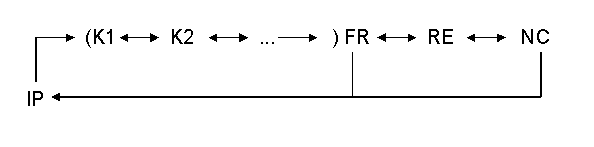
|
Abbreviation |
Meaning |
Icon |
Technical key |
|
IP |
In process (default initial status) |
|
I0570 |
|
K1, K2... |
User status |
ICON_CUSTOMER |
<E*...> |
|
FR |
For release |
|
I0571 |
|
RE |
Released |
|
I0590 |
|
NC |
Noncritical change |
|
I0600 |
Default Setting for Status Entries
You can enter a default setting in Customizing for specification status entries. To do this you enter a usage profile for the value assignment type Status assignment (ESTST) in the IMG activity Specify Value Assignment Types. If a specification does not have its own status entries, the system creates a list from the combinations of the initial status and the usages for the profile. These are not displayed on the Status tab page. The list is taken into account by the SAP System until you have explicitly entered new status entries on the Status tab page.
Person Responsible
You can enter the person responsible for a status entry as information.
The person responsible is managed in the SAP component Human Resources Management depending on the object type (for example, work center, job, position). The person responsible is linked directly to Organizational Management.
You can specify a person responsible as the default entry in Customizing for Product Safety in the IMG activity Specify Authorization Groups depending on the authorization group. This default entry is used by the SAP System as long as you have not entered an explicit person responsible for a status entry.
History
If you change the validity period for a status entry so that it has two or more validity periods, you can display all validity periods using the History function.
Assignment of Value Assignment Types
Depending on the specification type you can assign any value assignment types to each status in the IMG activity Specify Statuses. Using customer exits you can specify, for example, that the value assignment types for a particular status must be edited before the status can be assigned.
Authorization Concept
The SAP System guarantees that the status assignments can be made only by authorized users.
Search Function
In the initial screens for specification management and the specification information system, a search function allows you to display all specifications that belong to specific usage and a specific status as a hit list. From the hit list you can then switch to the next status.
Enhancements (Customer Exits)
You can use the customer exits in Customizing for Product Safety to specify that:


