

 Constraints: Entering Conditions
In the condition section of a constraint, identified by the keyword CONDITION, you define when a constraint is valid. This condition acts as a filter. Under RESTRICTIONS, you enter the consistency checks that a constraint is to make.
For example, you can define that a constraint is only processed if value ‘586’ is assigned to characteristic CPU for material ‘PC’:
OBJECTS:
PC IS_A (300) PC
CONDITION:
PC. CPU = ‘586’

If you enter more than one condition, there is an AND relationship between these conditions:
CONDITION:
PC.CPU = ‘586’ and PC.HARD_DISK = ‘1620’
Conditions in the Restrictions Section
Some simple conditions can also be entered directly in the restrictions section:
OBJECTS:
PC IS_A (300) PC
RESTRICTIONS:
PC.HARD_DISK = ‘1620’ if PC.CASING = ‘Tower’,
PC.HARD_DISK = ‘850’ if PC.CASING = ‘Minitower’
The hard disk can only have the value ‘1620’ for a tower, or ‘850’ for a minitower.
PART_OF and SUBPART_OF
If a constraint refers to several objects that are part of a BOM, you can use the CONDITION section to define that the constraint is only valid if the objects belong to the BOM of the superior material.
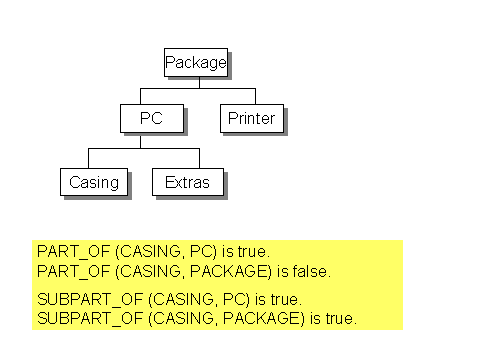
The example shows that a constraint is only processed if the casing is a component of the BOM for the PC. This condition is entered under CONDITION using the expression PART_OF:
OBJECTS:
PC IS_A (300)PC,
C IS_A (300)CASING
CONDITION:
PART_OF (C, PC)
The constraint is only valid if the casing is part of the PC.
The condition in the constraint is very important, because without the condition the constraint would be valid for all combinations including a PC and a casing, even if the casing is not in the BOM for the PC.
If you want a constraint to refer to the components of sub-assemblies, you use the expression SUBPART_OF.
OBJECTS:
P IS_A (300)PACKAGE,
C IS_A (300)CASING
CONDITION:
SUBPART_OF (C, P).
In this example, the condition PART_OF (C, P) is false, because the casing is not directly a component of the package.
Referring to BOM Items
You can also refer to a specific BOM item in the condition section. For example, if you want the casing to be in a specific BOM item, you enter the BOM item.
OBJECTS:
PC IS_A (300)PC,
C IS_A (300)CASING
CONDITION:
PART_OF (C, PC, ‘0050’)
The constraint checks whether the casing is item 50 of the BOM for the PC.