

 Layout of a Day’s Information
Use
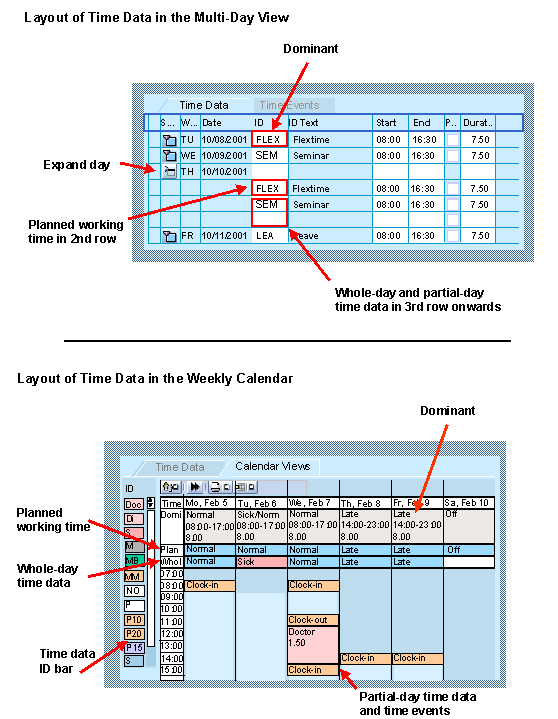
The Time Manager's Workplace enables you to view all time information required for evaluating a day at a glance. The information for the day is divided into various categories. This categorization ensures that the most important information on the day, the planned specifications, and additional time entries are always displayed in the same position in the time data maintenance views.
Features
You process the information for a day in the following categories:

In general, the personal work schedule valid for this day is displayed as the dominant. If, however, an illness or leave record exists for this day, the applicable time data ID (for example, an "I" for illness or a "V" for vacation) appears as the dominant.
The same applies if you assign the employee a different shift: The new shift then appears in the dominant line.
Information from the following infotypes can be displayed in the dominant line:
The dominant is always the principal entry in all views. If a day’s time entries are collapsed in the multi-person view and the multi-day view, only the dominant information is displayed. If you want to enter time data quickly in such a case, you can overwrite the dominant. When you choose ENTER, the day is expanded and the time entry is listed under the day’s time entries.