 Dynamic Eligibility Check for Concurrent
Employment
Dynamic Eligibility Check for Concurrent
Employment 
Use
Functionality to support dynamic eligibility checks is available for use in a Concurrent Employment environment.
Dynamic eligibility can be based on either actual hours worked or length of service and can be used as described below. In a Concurrent Employment environment, actual hours worked or length of service can be measured across multiple personnel assignments to:
· Control ongoing eligibility
· Define a waiting period for initial enrollments
Each dynamic eligibility condition is defined for a date type, which is subsequently assigned in an eligibility rule. When an employee completes the waiting period as defined by the rule, the appropriate date type is written to the employee's Date Specifications infotype (0041) record. When eligibility is subsequently checked in benefits processing (in Enrollment or the Participation Monitor), the system reads this record to determine whether the required date type exists, and therefore whether the employee has completed the dynamic waiting period or is still eligible for a plan.
If used as criteria for eligibility, an employee's actual hours or length of service across multiple personnel assignments are not determined every time eligibility is checked in benefits processing. Instead, these values must be determined periodically by running the Dynamic Eligibility Check report (RPUBEN47) in the background. This program writes the date types that control eligibility in benefits processing.

Since the timeliness of eligibility data is important for correct enrollments and accurate monitoring of participation, you should plan a Dynamic Eligibility Check to run at regular intervals and evaluate consecutive time intervals to ensure that no key dates are omitted.
The report selection period that you choose also depends on the evaluation periods that you specify for different conditions in Customizing. Since the report checks all dynamic eligibility conditions, including conditions that may involve multiple personnel assignments, you need to use a selection period that is appropriate for all evaluation periods.
You should only run the report when you are certain that the data upon which dynamic eligibility is based is stable, for example, after data consolidation has taken place and retrocalculations are therefore no longer possible.
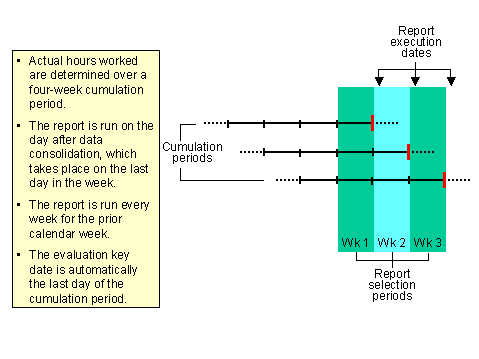
The following graphic shows an example of how the check report can be scheduled to check dynamic eligibility on the basis of actual hours:
Prerequisites
· Dynamic eligibility conditions have been set up in the Benefits Implementation Guide in the section Flexible Administration ® Programs ® Employee Eligibility ® Dynamic Eligibility.
·
If you determine eligibility based on
length of service calculated using the hours-counting method, cumulated hours
must be available on a special infotype (see  Service
Calculation). You extract these hours from payroll using the Extraction of Payroll
Cumulations function for the period corresponding to the eligibility
evaluation period.
Service
Calculation). You extract these hours from payroll using the Extraction of Payroll
Cumulations function for the period corresponding to the eligibility
evaluation period.
You might want to cumulate hours for dynamic eligibility over a period of a month, for example. In this case, you need to run an extraction each month for the identical period prior to running a dynamic eligibility check.
Activities
The report uses the following algorithm to check dynamic eligibility for each employee:
1. Determines the date types to which dynamic eligibility conditions are assigned in the employee benefit area.
2. For each date type, checks whether eligibility conditions are fulfilled:
Actual hours condition
The required actual hours worked are compared with the employee's time data read from the SAP Personnel Time Management component. The period within which this comparison is made depends on the cumulation period specified in the Customizing of dynamic eligibility conditions as follows:
- If the period is the term of employment, the period runs from the hire date (or the earliest begin date, if specified) until the day before the plant data collection (PDC) recalculation date on the Payroll Status infotype (0003) record or the last key date for evaluation, if that is earlier.
- If the period is fixed (for example, four weeks), several periods can be evaluated within the report selection period. The report reads data for all evaluation key days (the last day in an evaluation period specified in the Customizing of dynamic eligibility conditions). If the last PDC date falls within any of these periods, the report returns an error, because data for the full period was not available.
- In a Concurrent Employment environment, an employee's actual hours are determined across all personnel assignments that are grouped according to the Benefits Eligibility grouping reason.
Length of service condition
The required length of service is compared with the length of service determined by elapsed time (from specified infotype records) or actual hours worked {from payroll results stored after extraction on Retirement Plan Cumulations infotype (0602) records}.
The comparison is made on the last evaluation key date that falls within the report selection period.
As with actual hours, in a Concurrent Employment environment, an employee's length of service is determined across all personnel assignments that are grouped according to the Benefits Eligibility grouping reason.
3. The first time an employee fulfills the dynamic eligibility criteria, a Date Specifications infotype (0041) record is created with the appropriate date type. The actual date that the report stores for the date type is the day after the day on which the employee fulfills the criteria (the first day of eligibility), regardless of whether this falls within the report selection period.
The report also creates an Adjustment Reasons infotype (0378) record for any adjustment reason that is specified in the Customizing of dynamic eligibility conditions. This adjustment reason then appears in Enrollment to indicate that the employee can be enrolled in the relevant plan.
4. The next time the report is run, the system checks the eligibility conditions associated with every date type on an employee’s Date Specifications infotype (0041) record to determine whether the employee is still eligible. Whether this check takes place depends on your settings in the Customizing of dynamic eligibility conditions:
- If the settings specify that the condition must be fulfilled once only, a check only takes place if the relevant date type is not found on the record.
- If the settings specify that the condition must be continuously fulfilled, eligibility is checked on each evaluation key date. If the employee continues to fulfill the criteria, no changes are made to the record. If the condition is not fulfilled, the report delimits the record on the day after the end of the evaluation period, and creates new infotypes for any other date types that are still valid.
