 Linking ABAP Strings to Screen Fields
 Table Controls; and in

REPORT demo_dynpro_strings.
DATA: string1 TYPE string,
string2 TYPE string,
char1(10) TYPE c,
char2(100) TYPE c.
DATA len TYPE i.
string1 = '123 X'.
string1 = string1(10).
char1 = string1.
string2 = '12345678901234567890'.
char2 = string2.
len = strlen( string1 ).
WRITE: 'PBO:',
/ 'Length of STRING1:', len.
len = strlen( char1 ).
WRITE: / 'Length of CHAR1: ', len.
len = strlen( string2 ).
WRITE: / 'Length of STRING2:', len.
len = strlen( char2 ).
WRITE: / 'Length of CHAR2: ', len.
ULINE.
CALL SCREEN 100.
len = strlen( string1 ).
WRITE: 'PAI:',
/ 'Length of STRING1:', len.
len = strlen( char1 ).
WRITE: / 'Length of CHAR1: ', len.
len = strlen( string2 ).
WRITE: / 'Length of STRING2:', len.
len = strlen( char2 ).
WRITE: / 'Length of CHAR2: ', len.
ULINE.
The next screen number of screen 100 is 0 (statically-defined). Its layout is as follows:
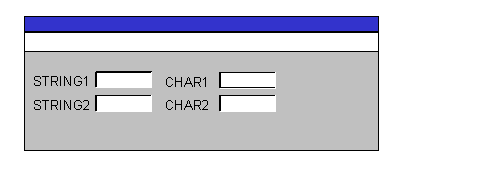
Each of the screen fields has a length of 10. No modules are called in the screen flow logic.
When the program runs, the system displays a screen with the values '
123 ' and '1234567890' in the fields STRING1,CHAR1, STRING2, and CHAR2. After you choose Enter, the following list appears:PBO:
Length of STRING1: 10
Length of CHAR1: 3
Length of STRING2: 20
Length of CHAR2: 20
PAI:
Length of STRING1: 3
Length of CHAR1: 3
Length of STRING2: 10
Length of CHAR2: 10
At the PBO event, STRING1 contains 10 characters, including 7 final spaces. These are lost when the content of STRING1 is assigned to CHAR1; now, CHAR1 is only 3 characters long.
At the PAI event, STRING1 also contains only 3 characters, since the spaces have been suppressed when the string was transported to the screen and back.
All the characters that do not fit into the relevant screen fields are cut off in both STRING2 and CHAR2.