

 Example: PC Printing
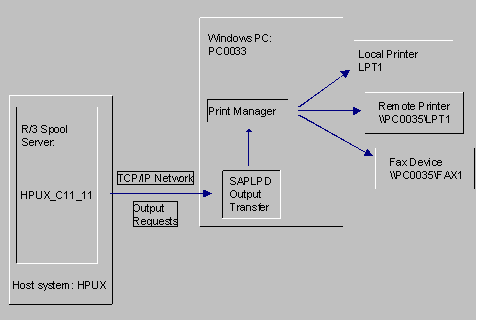
Assume you have the following configuration:
There is no R/3 application server on PC0033. You want to use SAP002 as the server for outputting R/3 data. The available output devices include the local printer SAP002P and the shared printer \\SAP003\SAP003P.
To implement this printing configuration do the following:
To start SAPLPD automatically add the program icon to the Startup folder under Start ® Programs or to the Start program group in the Program Manager (depending on the Windows system you are using).
The R/3 System accesses these devices in the same way by passing output requests to the print manager in PC0033.
Specify HPUX_C11_11 as the Spool server for each printer and fax device.
For Access method, specify S (Print on LPDHOST using R/3 protocol) if the output device is defined with the SWIN device type. Otherwise, you can specify either Access method U (Print on LPDHOST using Berkeley protocol) or S.
