

 Transferring a Report to the Report Portfolio
After you have created user groups and report classes, the third step is to transfer reports to the report portfolio. You can either copy reports from SAP-EIS drilldown reporting, or copy them from an external source using SAP-EIS data transfer.
Transferring Reports from Drilldown Reporting
When you transfer a report from drilldown reporting, you can choose to save the
Data or the Structure of the report in the report portfolio.Reports stored with data are saved (or ‘frozen’) with the data or graphics they contain at the time of transfer. This means that when you execute the report, the data displayed is exactly the same as when it was transferred. When you store reports with the structure, the report definition or a sequence of screens are saved. If new data records are posted to the SAP-EIS database, these are included when you execute the report in the report portfolio.
Since data can be selected at different points in time, you need to differentiate between two further cases with structure reports. If no data has been selected, the data is read when you call up the report. The data can, however, also be selected in the background processing(see
Freezing Report Data and Printing Reports in the Background A scheduled job can run at regular intervals, for example, every night. From the point of view of performance, it is advisable to use frozen data, and to only select current data when you need it. To select current data when calling up a report, choose Extras ® New selection.You can copy both individual screens and screen sequences from drilldown reporting. A screen sequence can consist of tables, graphics and comments.
The four possible types of report portfolio report are shown in the following figure. They are: the single screen with frozen data, the single screen with current data, the screen sequence with frozen data and the screen sequence with current data.
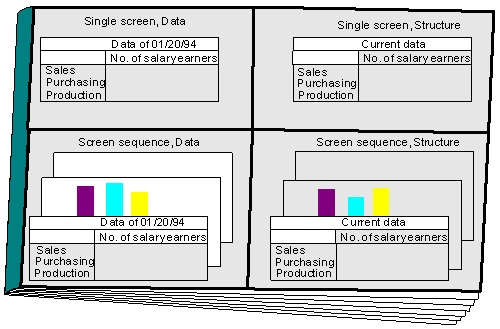
If you have defined exceptions in a report to be copied, these are also transferred to the report portfolio. For more information see Exception Reporting in the Report Portfolio
Note that changes made to a drilldown report after the report was copied into the report portfolio do not have any effect on the report portfolio report. Changes made to a form at a later date are, however, automatically made in structure reports based on that form. Since data reports always represent a copy of a list or screen sequence at a particular point in time, changes in the form on which such reports are based do not have any influence on the data report in the report portfolio.
You can access the transfer functions in the drilldown reports under Report
® Export. For more information see Copying Reports from Drilldown ReportingTransferring Reports from External Sources
There are two types of report which are transferred from external sources.
With this type of report, a list is copied into the report portfolio. No interactive functions are supported with these lists.
From within the report portfolio you can execute drilldown reports, Report Writer reports and ABAP/4 programs. By calling up certain ABAP/4 programs (for example, RKCWINEX) you can also start any PC program you choose.
You copy these into the report portfolio under Report portfolio
® Rep.portfolio report ® Transf.other -> Portf. For more information see Transferring Data to the Report Portfolio.