

 Validating Budget and Posting Addresses
Use
A Business Add-In (BAdI) is available in the budget control system with budget structure processing, in which you can define which account assignments should be excluded as budget or posting addresses in Funds Management.
You can use the BadI as an extra check to supplement the budget/posting addresses already assigned and corresponding checks.
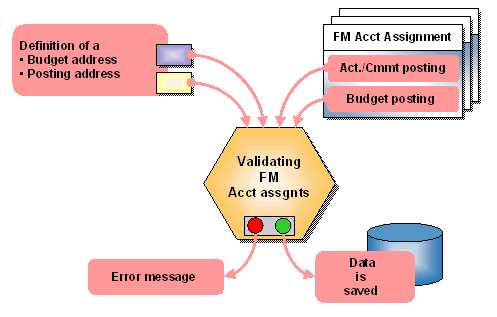
If you are working in the FM area/fiscal year without budget addresses or posting addresses, you can also use the validation for FM account assignments. The BadI enables you to exclude part of FM account assignments in the FM area for budget postings and/or actual/commitment postings.
If you have activated the BadI, then the check rules for the validation you defined are run with each posting of budget and/or actual/commitment.
If you have activated the check on budget addresses and/or posting addresses, the defined check rules for the validation are also run when creating the budget addresses and/or posting addresses.
Validating FM Account Assignments
Features
The BadI for the budget structure supports the following customer-specific implementations
With this method, you can define which FM account assignments are not allowed to be budgeted. These excluded FM account assignments can no longer be budgeted as budget addresses.
With this method, you can define on which FM account assignments actual and commitment postings are not allowed. These excluded FM account assignments can no longer be defined as posting addresses.
With this method, you can supplement the customer-defined source fields for the derivation from posting addresses and modify the derivation rules.
Inconsistency check
If you are using the validation of FM account assignments in the budget control system and make changes in the individual methods afterwards, this can lead to inconsistencies. An inconsistency occurs when an FM account assignment for each validation is excluded as a postable or budgetable FM account assignment, although posting data or budget data has already been entered on this account assignment.
You can use the inconsistency check in programs to check on this. You find these programs in the menu of Funds Management, under Master Data ® Tools ® Budget Structure (budget control system) ® Display Inconsistencies in Budget Account Assignments or Inconsistencies in Posting Addresses.
For more information, see the program documentation.
Activities
The BadI in the budget control system is delivered inactive by default. If you wish to activate a validation of the FM account assignment, you must execute a customer-defined implementation and then activate the BadI.

Note that for both methods Validating Budget Addresses and Validating Posting Addresses, you must use the implementation type Formula, whilst the method for defining customer-defined fields in the account assignment derivation is designed for ABAP-Coding.
You implement this BadI in the Customizing of Funds Management, under Master Data ® Budget Structure for the Budget Control System (BCS) ® Business Add-in for Budget Structure ® Validate Budget and Posting Addresses in the Budget Structure.
For more information on this, refer to the IMG and the corresponding method documentation.