 Environment Object Selection (Focus Operation)
Environment Object Selection (Focus Operation)
Purpose
This process is carried out automatically by the system after it has determined the focus objects according to your selection criteria and copied them from the database to the worklist.
Prerequisites
The working area, in which you are working, has the focus Operation.
Process flow
The system copies the following environment objects from the database to the worklist (see Environment Object Selection graphic)
Environment Object Selection (Focus Operation)
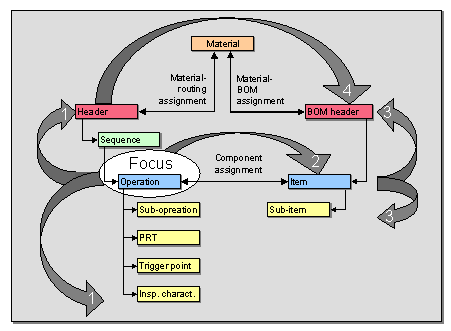

For an object can be copied to the worklist, its object type must be in the working environment.
Result
Your worklist is filled. You can now display and edit its objects in the Engineering Workbench.