Loading Data for a Runtime Version
Purpose
To create a runtime version for a knowledge base, you collect all the objects that are in a knowledge base at a certain point in time.
There are restrictions for the following objects:
·
Actions are only loaded if you set the Incl. actions indicator when you create the runtime version. These actions are converted internally to procedures, so that you can define the sequence in which they are processed. Actions are inserted before any procedures, so actions are processed first in the SCE.·
Actions and procedures for characteristics and characteristic values are not loaded. If you want to use these dependencies, assign them to the configuration profile before you create the runtime version. You may need to add an IF condition to achieve the same effect.·
A runtime version only allows one configuration profile for a configurable material. If a configurable material has more than one configuration profile, you must select one.·
Value hierarchies are ignored. The value nodes in the hierarchy are filtered out, and only the individual values are loaded. For example, characteristic COUNTRY and value node ‘Europe’ are ignored, and only the individual values ‘Italy’, ‘Denmark’, and ‘Portugal’ are loaded.·
Characteristics with a user-defined data type are not loaded.·
All characteristics must be assigned to a class. This includes reference characteristics.·
If objects have been processed with engineering change management, the version that is valid on the date when you create the runtime version is loaded.SCE Mode
When you create a runtime version, you see the SCE mode indicator. This indicator is not active in Release 3.1I. In later releases, this indicator determines whether you load a knowledge base created with the R/3 configurator or a knowledge base created with the SCE.
If you use the SCE to create a knowledge base, there are no single dependencies and no configuration profiles. Instead, you define tasks and events for the knowledge base object. This changes some processes in the diagrams below.
In Release 3.1I, you cannot use this SCE functionality. Instead, you use compatibility mode, which lets you download existing configuration models to the SCE – with the restrictions described above. For this reason, this documentation does not contains any further detail of SCE mode.
Process Flow

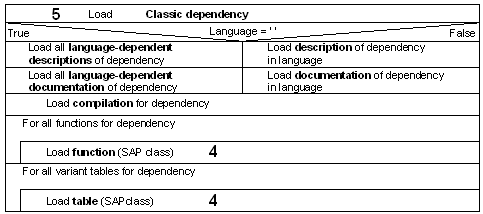
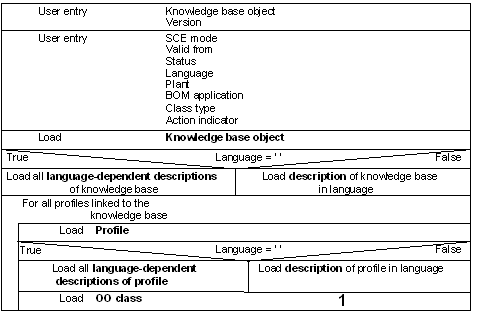
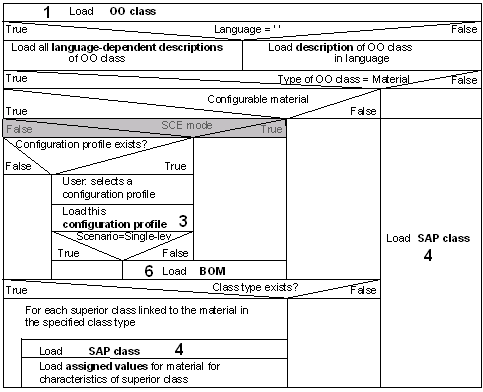
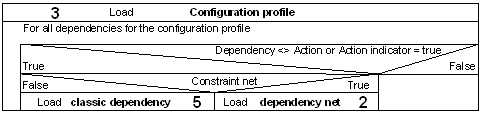
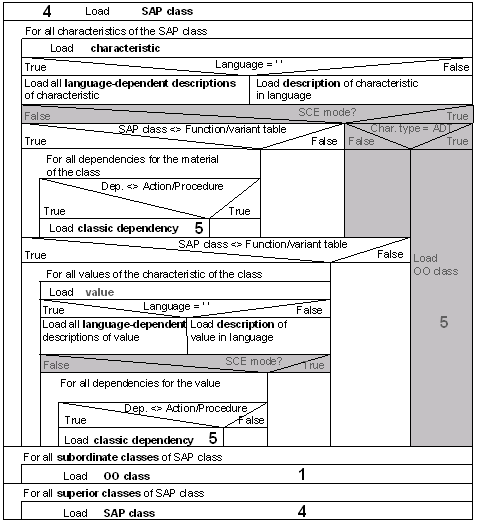
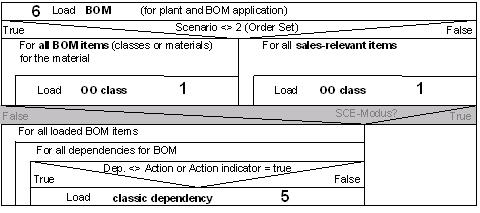
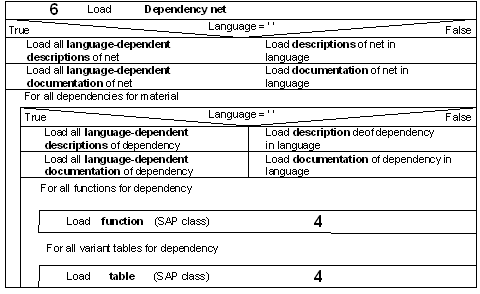
Diagrams are used to show the process of loading the knowledge base. One box in the diagram denotes one action. An empty box shows that the action is repeated until all objects are loaded.
IF conditions (TRUE, FALSE) are shown in triangles in the boxes.
The large figures show where individual boxes are expanded or collapsed. For example, the first diagram has a 1 on the right-hand side of the box labeled ‘Load OO class’. This box is expanded in the second diagram, which has a 1 at the top left-hand corner.
1. When you generate the runtime version, first the knowledge base object is loaded, with all its profiles.
If you enter a language for the runtime version, all the descriptions are loaded in this language. If you do not enter a language, the descriptions are loaded in all languages.
The OO class – either a configurable material or a class of configurable materials – is loaded for each profile.
2. The OO class can be an R/3 class or a material. The descriptions of the classes or materials are loaded. Depending on your entry in the runtime version, the descriptions are loaded in all languages or only one language.
The transaction for loading R/3 classes is described in point 4.
Materials are checked as to whether they are configurable or not.
If an OO class is a configurable material, the system checks for configuration profiles. If the material has more than one configuration profile, you must select one manually. The configuration profile you select is loaded.
The system checks the settings for BOM explosion. If the configuration profile has the setting Planned/production order: Single-level, the BOM is not loaded, because the BOM is not needed for configuration in the SCE. If the configuration profile has any other setting, the BOM is loaded.
Class allocations are loaded for both configurable and non-configurable materials.
Any values assigned to a material in these classes are loaded.
3. When you load the configuration profile, the system checks all of its dependencies.
If you set the Incl. actions indicator, the actions for the configuration profile are loaded and converted to procedures. If this indicator is not set, only the dependency nets and procedures for the configuration profile are loaded.
4. R/3 classes are loaded if a configurable material (KMAT) is allocated to classes, if the OO class is a class, or if the BOM contains class items.
All characteristics of the class are loaded.
The system then checks whether any of the classes are variant functions or variant tables, rather than actual classes, because both variant functions and variant tables are stored internally as classes in releases up to and including 4.0C. The characteristics assigned to variant tables and variant functions are loaded. Then the value assignment alternatives are loaded. Table entries in tables are also loaded.
Only the interface is loaded for variant functions, not the ABAP function code. For the SCE, you must create a JAVA method with the same name and exactly the same interface as the ABAP function module.
If the classes are neither functions nor variant tables, the selection conditions and preconditions for the characteristics are loaded.
All values of these characteristics are loaded, together with the preconditions allocated to the values.
Actions and procedures for characteristics and characteristic values are not loaded.
You can allocate further classes or materials to the class that is loaded as the OO class.
This class can also have superior classes, from which it inherits characteristics. These superior classes are loaded, too.
5. The BOM of configurable materials is loaded, unless the configuration profile has the setting Planned/production order: Single-level.
For materials with the configuration profile setting Sales order, only the sales-relevant items are loaded, because only these are relevant to the SCE. If the configuration profile has any other setting, the entire BOM is loaded.
BOM items can be either materials or classes. When you load the OO class, the system decides whether each BOM item is a class (class items in the BOM), a configurable material, or a non-configurable material. Class items are only loaded if they contain materials (class type 200). Class items for documents are not loaded (class type 201).
The selection conditions and preconditions for BOM items are loaded. If you set the Incl. actions indicator, the actions are loaded.
6. For a dependency net, language-dependent descriptions are loaded for the net and all its constraints, in all languages or in the language you select.
The functions and tables used in the syntax are also loaded.
7. For a single dependency, language-dependent descriptions and documentation are loaded in all languages or in the language you select.
The functions and tables used in the syntax are also loaded.