

 Using Function Exit FTXW0001
Use
When adding fields into an SAP-provided segment, you need to create and activate the function exit FTXW0001, if one (or both) of the following conditions applies:
Adding Fields from Additional Tables
When extracting data defined by an SAP-provided segment, the system reads data from the source tables of the fields that were originally defined in the segment. This may include one or more source tables.
The mapping of the fields that are included in the segment to the source table(s) in the R/3 database is done through the definition of a corresponding structure in the Data Dictionary.
If you wish to add a field into an SAP-provided segment, and this field resides in another table than the ones already included in the Data Dictionary structure, then you need to use the FTXW0001 function exit to read the data from the additional table in the database, as illustrated below:
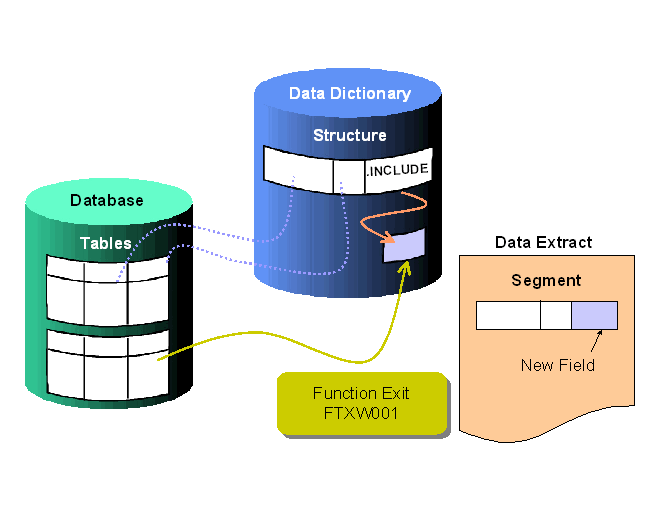
The segment configuration lists the source tables.
Adding Numeric Fields
The fields in a DART segment must all be characters. If any of the fields you are adding to an SAP-provided segment is
numeric, then you must convert the data in that field to character by using the function exit FTXW0001, as illustrated below:
Prerequisites
The DART segment and its corresponding Data Dictionary structure must exist as part of the set provided by SAP.
Adding fields into a customer-defined segment, that is, a segment that you or someone else has added to DART, is easier to do as part of the
function exit that creates the segment. (FTXW0002)You also have to first
extend the Data Dictionary structure to add the necessary fields.Procedure
You create and activate the function exit using R/3 Customer Enhancement (transaction CMOD).
Your function exit must perform the following tasks:
|
If You are Adding… |
Your Function Exit Should… |
| Numeric field(s) |
Convert the fields to character |
|
Field(s) from additional tables |
Read the necessary data fields from the table in the database into a program record |
Result
If you create and activate the FTXW0001 function exit, then when extracting data, the system calls the function exit for every record before it exports the data into the extract file(s).