Formula Evaluation
Use
You can have the measured values of a characteristic (calculated characteristic) automatically calculated from the input and results of other characteristics (calculation input characteristics). The formula is automatically evaluated when the characteristic is valuated. You can trigger the formula evaluation before the characteristic valuation.

You can determine the weight of a glass bottle, by determining the weight of the empty bottle and the volume of water needed to fill it. Both these measurements are represented as calculation input characteristics; the total weight is then the calculated characteristic.
Prerequisites
For formula calculation, the following prerequisites must be fulfilled:
You can use standard mathematical functions in this formula, as well as the following operands:
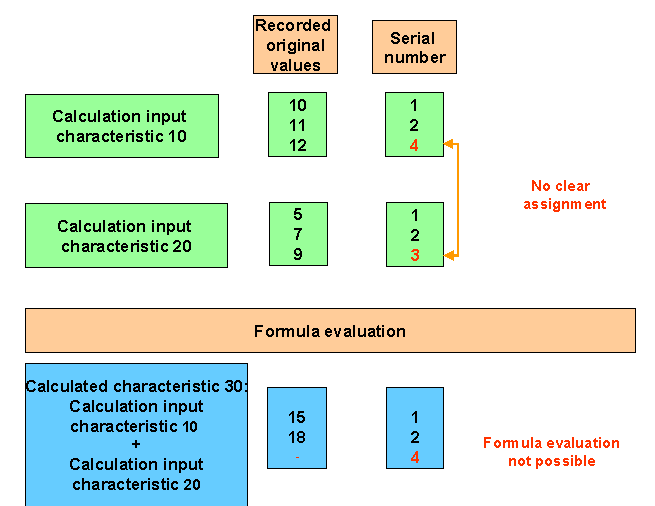
To evaluate the formula for original values, you must ensure that a reference is made to the same serial number for the calculation input characteristics. The "Serial number - original value" assignment is the decisive factor for the first (leading) calculation input characteristic. If a serial number is not available for the first calculation input characteristic in another calculation input characteristic, you cannot evaluate the formula.
Activities
To calculate the formula from the valuation, choose:
If values from other characteristics are used in the formula, these calculation input characteristics must have already been valuated before the formula can be calculated.
To display the formula, choose Extras ® Formula ® Display formula on the characteristic overview screen or the characteristic single screen.
The formula printout is then displayed in a window.