

 Example: Definition of a Drilldown Report
Example 1
The following graphic shows the definition of a drilldown report for Budget Values of Investment Measures. The form has only one column. You specified that the first row of the column should display the key figures: overall budget value, budget values of individual years and annual budget totals. You specified that the column should display the budget value type.
Under Extras, you specify which columns and rows should be displayed in the drilldown list.
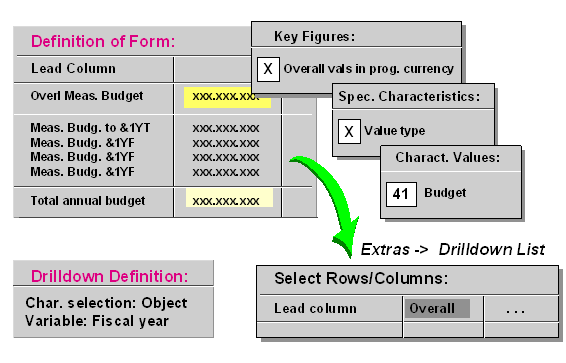
Definition of a Drilldown Report
Also note: you have to further specify the rows for annual values by entering the annual values characteristic and the variable for the year.
In the actual drilldown definition, you only need to enter the object characteristic and the fiscal year variable.
Example 2
You want to create a drilldown report for comparing plan and actual values of investment measures for the year 1997. The example shows a one-dimensional form for doing this:
Lead column | |
Plan |xxx,xxx|
Actual |xxx,xxx|
Both rows have the same key figure (annual value in investment program currency) and the same selection of characteristics (value type and fiscal year). In both rows, you should enter the fiscal year with the value 1997 characteristic. In the first row, the value type characteristic has to be entered with the value 01 (plan value). Enter the value 04 (actual) in the second row.
When you create the drilldown report, you have to use this form as a basis. In the definition of the drilldown report, you then only have to select the measure characteristic. When you call the report, the drilldown list then looks like this:
Measure | Plan | Actual |
WBS 864.013 De-aerator |105,000.00| 75,898.00|
WBS 736.001 Extruder | 73,380.00| 34,226.00|
WBS 600.711 Assembly line |365,000.00|265,000.00|
. . .
The detail list for a selected measure (for example, WBS 736.001) would look like this:
Lead column | |
Plan | 73,380.00|
Actual | 34,226.00|