

 Ordering Process
Use
When you are using the integration of the IM component and the Materials Management (MM) component, you can post acquisitions to an investment measure (WBS element or order) using the ordering process in Purchasing.
Features
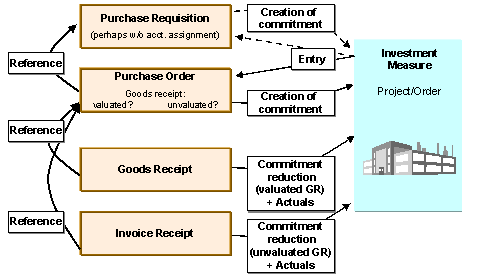
When you obtain goods or services for your investment measure externally, you can post the purchase requisition or the purchase order directly to the investment measure. You post the goods receipt or invoice receipt in warehouse accounting using the purchase order as a reference. The system automatically debits the investment measure with the order value or invoice value.
Purchase Requisition
You can enter the investment measure in the purchase requisition. Enter account assignment category
P in the purchase requisition to make account assignment to projects; enter account assignment category F for the purchase requisition to make account assignment to orders.If the investment measure is not known when you enter the purchase requisition, or has not yet been entered in the system, enter
U for unknown account assignment.When you enter the investment measure in the purchase requisition, the system creates a commitment on the investment measure for the amount of the order. The system manages commitments from purchase requisitions separately from commitments from purchase orders.
When you create the purchase order, you can use the purchase requisition as a reference.
Purchase Order
If you have entered the purchase requisition without an account assignment, you have to enter the account assignment (investment order or investment project) when you create the purchase order. In the purchase order, you specify whether the goods receipt should be valuated or unvaluated. This decision affects the later reduction of the commitment.
If you enter the investment measure in the purchase order, the system creates a commitment for the order amount on the investment measure. If you had already entered account assignment to the investment measure in the purchase requisition, the system converts the purchase requisition commitment into a purchase order commitment.
When you post the goods receipt, the system automatically adopts the values from the purchase order. You only need to check if the quantity you ordered was delivered. If the delivery is over or under, you can correct the quantity.
Ordering Process
Valuated Goods Receipt
If you did not set the indicator for unvaluated goods receipt in the purchase order, the commitment is reduced by the goods receipt. For partial deliveries, the system reduces the commitment in proportion to the quantity you actually received. The system also offers the option of reducing the commitment based on value amounts.
You may receive a partial delivery and the missing goods will not be delivered later. In this case, you can set the Final delivery indicator in the purchase order. The commitment is then reduced completely, although the delivery was not complete.
When posting the invoice receipt, you can use the purchase order as a reference. The system shows the purchase order price, multiplied by any existing purchase order quantity, as the invoice price.
Valuated Invoice Receipt
If you set the indicator for unvaluated goods receipt in the purchase order, the system will reduce the commitment when the invoice receipt is entered.
If you did not set the indicator for unvaluated goods receipt in the purchase order, the system corrects the price from the goods receipt when the invoice amount is higher or lower than the purchase order amount.
Accounts for Ordering Process
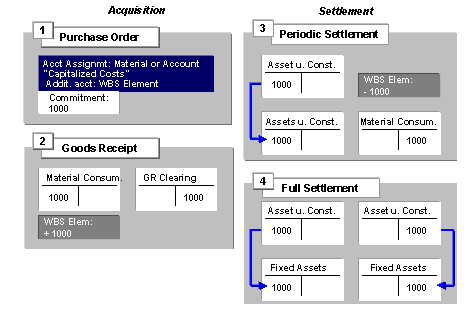
The following graphic provides an overview of the accounts used for the acquisition and settlement of a debit on an investment measure.
Account Overview of Acquisition
A purchase order for material initially creates a commitment in the amount of the material price. You have to enter the material and the additional account assignment to the WBS element in the purchase order. At the time of the goods receipt, the system creates an expense posting for ‘consumption of material.’ The system determines this account using the account determination of the material. At the same time, the system debits the WBS element with the ‘consumption of material’ cost element (corresponding to the expense account). When the periodic settlement takes place, the system credits the WBS element with the ‘consumption of material’ cost element, and debits the asset under construction that belongs to the investment measure or that asset’s APC balance sheet account. During the full settlement, the system transfers the debit from the asset under construction to completed assets, that is, the balance sheet account for fixed assets.
See also:
Creating Purchase Requisitions Creating Purchase Orders Posting Goods Receipts Posting Invoice Receipts