

 Master Data Maintenance
Use
You create an investment measure in the system by creating an order or a WBS element (refer to
Features of Investment Measures).When the order or WBS element is released, the system checks whether an investment profile has been assigned to it. If there is an investment profile, the system identifies the order or WBS element as an investment measure, and creates (if certain conditions are met) an accompanying asset under construction. The system then assigns the investment measure Asset under construction created system status. The investment measure thereby has the master data of the order or WBS element as well as the master data of the asset under construction.
The following graphic shows the most important master data of an investment measure, from the viewpoint of Investment Management.
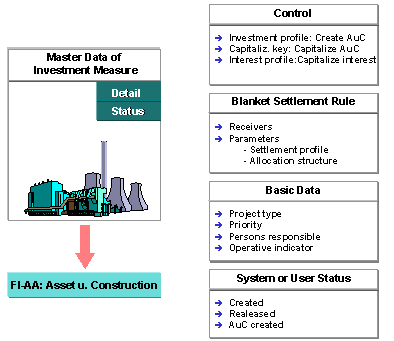
Master Data of an Investment Measure
Features
In order to use the automatic creation of an asset under construction, you have to create one or more special asset classes and enter one asset class in each investment profile. These asset classes provide the system with all the master data needed for creating the asset under construction. The asset classes for investment measures have a special indicator. You set this indicator in the asset class, in order to reserve the asset class for investment measures. Assets in these classes
It can be helpful to use several asset classes for investment measures, rather than just one asset class for all investment measures. The asset class can then pass on specific values to the asset under construction for special depreciation terms or investment support. It is also useful when you have more than one balance sheet account for assets under construction. You can also specify in the investment profile whether it is permitted to manually enter other asset classes (instead of the default class) when creating an investment measure.
The following graphic shows the functions of the asset class when creating an investment measure:

Function of the Asset Class
Master Data of the Asset under Construction
If the asset class has been maintained sufficiently, you do not need to make any other master data entries in the asset under construction. The system copies the description and the organizational assignments (cost center, plant, location, business area, and jurisdiction code) directly from the order or WBS element. If you need it, you can also call the complete master data maintenance transaction for assets (choose Extras from the menu).
The system copies the values from the following fields in the order or WBS element to the accompanying asset under construction:
·
Order number or WBS element number·
Description·
Organizational assignments (company code, business area, requesting cost center, location, tax jurisdiction code)
It is important that you do not suppress these fields in the screen layout control of the asset class.
It is also basically possible to change these automatically created assets under construction using master data maintenance in the Asset Accounting (FI-AA) component. However, the fields that have to agree with the order or WBS element (such as organizational assignments) cannot be changed there.
Incomplete Assets
Sometimes not all the master record information for an asset under construction can be defaulted from the asset class. Sometimes a given user has only a limited asset view (see the section below titled Authorizations). For these two reasons, the automatically created asset under construction has a status:
The system uses workflow procedures to manage incomplete assets. It sends them in the form of a worklist to the R/3 mailbox of the responsible asset accountant. In order for this automatic workflow to take place, however, you have to make some fundamental settings in Customizing for Asset Accounting. It is particularly important for the standard task Change asset to be correctly assigned and active. For more information, see the Implementation Guide (IMG) for Investment Management (Master Data
® Assets under Construction).If you do not wish to use R/3 Workflow, you can find incomplete assets using a special standard report (Asset Accounting menu: Tools). For more information, see
FI-AA Asset Accounting .Number Assignment for the Asset under Construction
In Asset Accounting, the assignment of the asset number is controlled by the asset class. You specify the number range interval in the asset class. Number assignment must be internal when you plan to use the automatic creation of an asset under construction for an investment measure. Enter number range intervals with internal number assignment in the asset classes for these assets under construction.
In order to be able to assign the asset number externally, you have to create the asset under construction manually before its order or WBS element has Released status. When using this method, keep the following in mind:
Status Management
Internal orders and projects are also linked to general SAP status management. This link to status management means you can guarantee that certain business transactions can only be carried out if the order or WBS element has a certain status.
Along with the freely definable user status, the system automatically sets a system status. You can release an order or WBS element using Edit in their master data transaction. This release is a prerequisite for account assignment from the investment measure.

You can specify in the Customizing definition of the order type that an order should be changed to Released status as soon as it is created.
Authorizations
In order to maintain fields in the order or project you need CO authorization. In order to maintain fields in the asset under construction you need FI-AA authorization. You can change the asset under construction using master data maintenance in the Asset Accounting (FI-AA) component. You call the same screens as for normal asset master data maintenance. For more information on the required FI-AA authorizations, see the FI-AA Implementation Guide.
Along with standard authorizations, the FI-AA component uses asset views to limit access to asset master records. For example, the Cost accounting asset view allows only asset master record information related to cost accounting to be maintained (refer to
FI-AA Asset Accounting). When a user with a limited view creates an investment measure, and important fields are not default values from the asset class, the asset is then incomplete. Such incomplete assets have to be completed later using workflow.Changing Organizational Assignments
When you make a change to organizational assignments in the master record of an investment measure, the system checks if this change is also permitted for the asset under construction.