

 Budget Categories
Use
You can manage several budgets in parallel for an investment program.

This is useful for managing separate budgets for costs to be capitalized and incidental costs that are not capitalized.
Prerequisites
You defined your budget categories per program type in Customizing for Investment Management (choose Investment Programs ® Budgeting in Program ® Budget Categories). The following budget categories are provided in the standard system:
You specified separation by budget categories in the definition of the investment program.
You assigned a usage indicator to the budget categories. This indicator permits the system to separate the actual values that come due according to budget categories.
Features
When you have stipulated the use of budget categories in the definition of the investment program, you have to enter the values separately for the budget categories when you budget the program. In the same way, you always have to enter plan values by budget category.
Budget Categories and Measures
Investment measures do not allow for entering values by budget category, as is the case on investment program positions. On investment measures, you enter plan and budget values without making any distinction regarding the budget category.
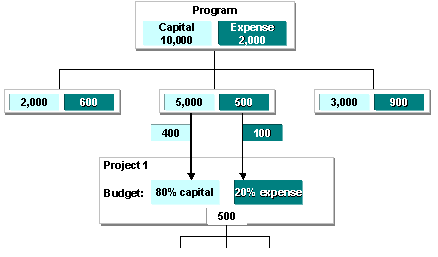
However, it is still possible to establish the proportion of plan and budget values from an individual measure that can be attributed to defined budget categories (comparison in reporting). To do this, you can specify corresponding percentage rates per budget category. This is done when assigning the individual measure to the investment program position. The plan and budget values of the individual measure are then weighted with these percentage rates, and can be assigned to the appropriate budget categories.
Budget Categories

When you use budget categories, you have to budget your investment measures yourself directly. Budget distribution is not possible from the program positions higher in the hierarchy (refer to
Standard Assignment of Actual Values to Budget Categories
For actual values, the standard system can distinguish the following kinds of debits:
You assign actual values to budget categories by setting the usage indicator for the budget category (see above). However, this separation of the actual values is only possible once the periodic settlement has been carried out (refer to
Settlement of Investment Measures).
Be careful if the capitalization keys of an investment measure specify that less should be capitalized in the book depreciation area than in the cost accounting depreciation area. (That is, a certain percentage of the amount to be settled is settled to nonoperating expense, rather than to assets - refer to
User-Defined Assignment of Actual Values to Budget Categories
There is another option in addition to the standard assignment of the actual values to budget categories 1 and 2. You can use user exit AAIP0001 to create your own assignments to budget categories you have defined yourself (for example, by cost elements or cost element groups).
For more information, see the R/3 online documentation for customer exit AAIP0001 (in transaction CMOD under Help).
Information System
The individual budget categories are displayed separately at the level of the investment program, as well as at the level of the individual measure, in the Information System.
Standard drilldowns report on budget categories 1 and 2 that are provided by SAP. If you work with your own user-defined budget categories, then you have to enter them in the form so that the system can select the data records.
Example
The following graphic shows how the different budget categories are displayed in reporting:

The investment program has a capital budget of 1900, and a budget for costs that are not capitalized of 600. At the level of the assigned investment measure, it was specified that the budget for the measure (2000) should be made up of 80% capital budget and 20% costs budget. Of the posted actual debits of 900, 600 are settled to an asset and 300 are settled to a cost center.