

 Versions for Planning
Use
Planning for investments in an approval year is often not a one-step process. Instead it involves a series of steps or versions. These versions represent various stages in the development of planning, or various stages in the approval process.
Features
You can manage the plan values of an investment program in the system, therefore, in multiple plan versions. For each investment program position, you can enter alternative plan values in each plan version. You define the plan versions in Customizing for Investment Management (choose Investment Programs
® Planning in Program). You have to link each version to an approval year.
The structure of the investment program remains the same when you create a new version. The new version simply enables you to enter new plan values.
Measures
You can also manage versions at the level of the measures (WBS elements or orders) assigned to your investment program. However, these versions are not year-dependent. This means that the plan values of version 001/1998 are overwritten by the plan values of version 001/1999, for example. Therefore, if you want to roll up the plan values from investment measures over the course of several years to the investment program, and you want the values to be dependent on the given version, then you have to use a unique key for the versions that is not year-dependent.

A version for the year 1999, for example, cannot have the same key as the version for the year 1998. One option is for you to include the year in the key for the version (971, 972, 981, 982, and so on).
Another option is to use the same versions each year (for example, 001, 002, 003). Then you have to make sure that you revise the plan values of the versions at investment measure level each year. Otherwise, the outdated values at investment measure level from version 001 will flow into the current version 001 of the investment program in the current year. If you want to prevent the plan values from the outdated version at investment measure level from being overwritten, you can create a summarization database (refer to
Summarization ).Appropriation Requests
You cannot create versions for appropriation requests. Instead, you can create any number of appropriation request variants (refer to
Appropriation Request Variants ). You can assign one version to each appropriation request variant. Using this method, you can link each different variant for planning or implementing the appropriation request to a given version. You make this assignment individually for each appropriation request.
Versions and Appropriation Request Variants
Activities
When you create a new version for an investment program, you have to carry out another rollup of the plan values from the assigned measures and appropriation requests on the investment program. The procedure is outlined below:
This function is found under Periodic processing
However, when you make changes to the carryforward version of the old year, this can result in different carryforward amounts in the versions in the current year.
Blocking a Version
In Customizing, you can block a version to changes. When you block a version, the system also blocks the assignment of variants to this version, as well as blocking any currently assigned variants themselves to changes.
Example
The following graphic shows the forwarding of plan values, dependent on versions, from fiscal year 1997 to 1998.
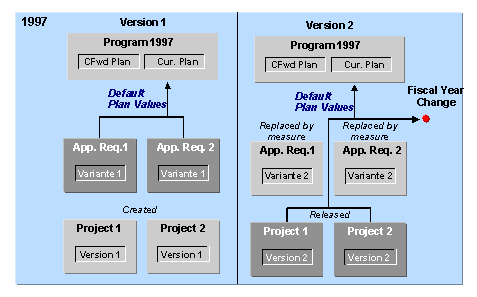

Versions and the Fiscal Year Change
In 1998, the system rolls up only the difference between 1997 and 1998 for projects 1 and 2 on the investment program. Using this difference is made necessary by the fact that the plan values from 1997/version 2 were already carried forward to the current investment program (1998). Now, at this point only the difference in the plan values is added to the current planning for these projects.