

 Security Monitor
Use
You can use this monitor to monitor messages in the
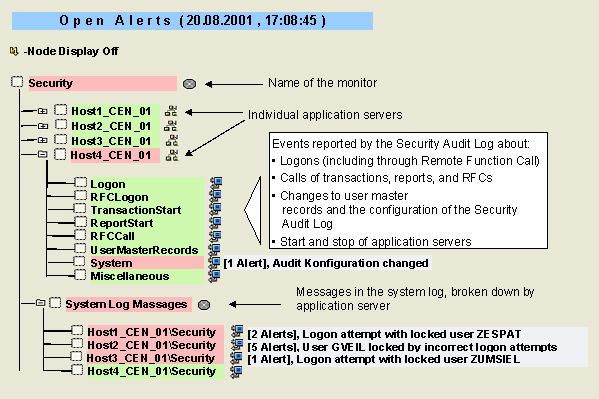
 Security Audit Log, broken down into various areas, and to monitor security-relevant messages in the system log (see also Comparing the Security Audit Log and the System Log).
Prerequisites
You must have activated the Security Audit Log (transaction SM19).
Features
The following table provides information about the monitoring tree elements (MTEs) of this monitor:
|
MTE |
Description |
|
Logon |
System logon events reported by the Security Audit Log:
|
|
RFCLogon |
RFC/CPIC logon events reported by the Security Audit Log:
|
|
TransactionStart |
Transaction events reported by the Security Audit Log:
|
|
ReportStart |
Events connected with starting reports reported by the Security Audit Log:
|
|
RFCCall |
Events connected with calling Remote Function Calls (RFCs) reported by the Security Audit Log:
|
|
UserMasterRecords |
Events connected with changes to user master records reported by the Security Audit Log:
|
|
System |
Events connected to system parameter changes reported by the Security Audit Log:
|
|
Miscellaneous |
Other events reported by the Security Audit Log:
|
|
System Log Messages |
Messages in the system log for the security category; you can set the category in which a message is reported, the message text, and the severity and criticality of the alert using the message ID in transaction SE92 |
The system records security-relevant actions in the Security Audit Log. You decide which actions are recorded there and which should trigger an alert in the Alert Monitor on the Security Audit Log configuration screen (transaction SM19).
See also
Defining Filters
Activities
To start the monitor, follow the procedure below: