
 Setting Quantity Rounding
You may encounter unmanageable quantities when splitting schedule lines from the forecast delivery schedule. It is difficult to establish planning or delivery relevance for these quantities, and therefore they may not be suitable for processing. You set the rounding rule to specify how the system is to deal with these quantities. You can round generated schedule line quantities to:
If this rounding quantity has not been specified in the scheduling agreement item, the system rounds schedule line quantities to the number of decimal places defined for the sales unit.
Using any one of these rounding procedures may result in a remaining quantity that the system does not associate with any schedule line in the planning delivery schedule. The system assigns this quantity to the first schedule lines generated in the planning delivery schedule, according to the split shares that you have specified.
Example
No Rounding
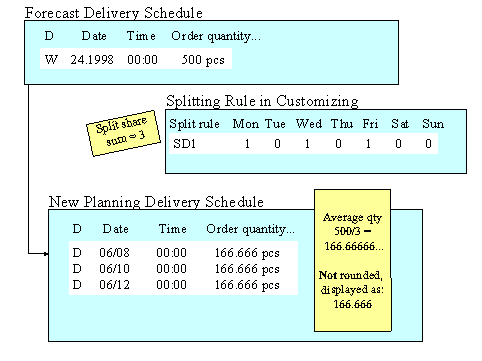
You want to split the schedule line in the forecast delivery schedule for week 24, 1998 (06/08–06/14) with 500 pieces. In Customizing, you maintain the splitting rule, assigning one split share to Monday, Wednesday, and Friday. The sales unit piece has been set in the scheduling agreement item to be rounded to 0 decimal places. The delivery rounding quantity is 5 pieces.
When you generate the new planning delivery schedule, the system calculates the average quantity by taking the schedule line quantity and dividing it by the split share sum. The system assigns this quantity, 166.66666... pieces (500 pieces divided into 3 split shares) to each split share. The resulting planning delivery schedule has 3 daily schedule lines each with 166.666... pieces. However, the schedule line quantity is displayed to only three decimal places.
Rounding to Three Decimal Places

If you set the system to round to three decimal places, the system treats the above schedule line split differently. It rounds the schedule line quantities in the planning delivery schedule to 166.666 pieces. Because of the split and rounding process, the total quantity falls short of the original schedule line (500 pieces) by 0.002 pieces. This remaining quantity is divided and assigned to the schedule lines according to their split shares.
The resulting planning delivery schedule has schedule lines for days 06/08 and 06/10 with 166.667 pieces each, and 06/12 with 166.666 pieces.
Rounding According to the Sales Unit
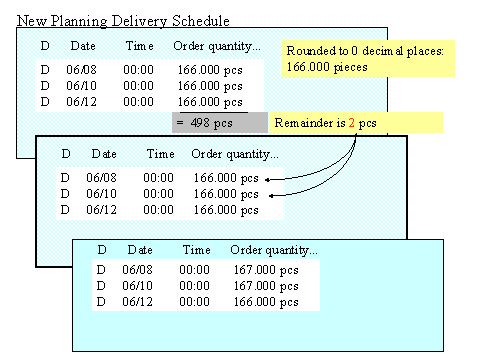
If you set the system to round according to the sales unit (in this example 0 decimal places), the system rounds the schedule line quantities in the planning delivery schedule to 166 pieces. Because of the split and rounding process, the total quantity falls short of the original schedule line (500 pieces) by 2 pieces. This remaining quantity is divided and assigned to the schedule lines according to their split shares.
The resulting planning delivery schedule has schedule lines for days 06/08 and 06/10 with 167 pieces each, and 06/12 with 166 pieces.
Rounding to Multiples of the Delivery Rounding Quantity
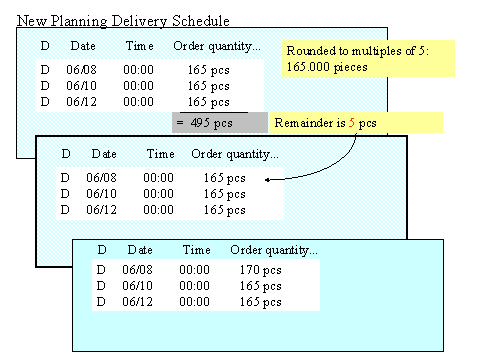
If you set the system to round to multiples of the delivery rounding quantity, in this case multiples of five, the system rounds the schedule line quantity in the planning delivery schedule to 165 pieces. Because of the split and rounding process, the total quantity falls short of the original schedule line (500 pieces) by 5 pieces. This remaining quantity is assigned to the first schedule line according to its split share.
The resulting planning delivery schedule has schedule lines for the day 06/08 with 170 pieces, and for days 06/10 and 06/12 with 165 pieces.