
 Setting Holiday Rules
A holiday rule specifies how the system handles schedule line quantities in the planning delivery schedule that fall on a holiday.
When splitting weekly or monthly schedule lines from the forecast delivery schedule, the system assigns schedule lines to the planning delivery schedule according to the split share that you have assigned to weekdays. Sometimes, these weekdays may be designated as holidays. You set the holiday rule to specify how the system deals with schedule line split shares that coincide with holidays.
You can:
The system ignores holiday designations and assigns generated schedule lines unchanged to the planning delivery schedule.
The system shifts a schedule line to the first workday before the holiday, in the same week or month, even if you have not specified a split share for that day. If you have already assigned a split share to that day, the system adds this quantity to it.
If there is no preceding workday (for example when a holiday falls on a Monday or first day of the month), the system shifts or adds the schedule line to the first workday after the holiday, in the same week or month. If there is no workday (for example during a shutdown), the system ignores holiday designations and assigns generated schedule lines, unchanged, to the planning delivery schedule.
The system divides the schedule line quantity among the other days, in the same week or month, with a split share. If all other days with split shares are designated as holidays, the system ignores these designations and assigns generated schedule lines, as they are, to the planning delivery schedule.
Schedule line dates are requested delivery dates. For this reason, the system checks each date against the ship-to party calendar to determine if the daily schedule line generated in the planning delivery schedule falls on a holiday. The system uses the calendar stored in the scheduling agreement item for the unloading point. There is a
user exit that allows you to modify this calendar.Example
No Holiday Rule

Monday, 06/01 is a holiday.
You want to split the schedule line in the forecast delivery schedule for week 23, 1998 (06/01–06/07) with 600 pieces. In Customizing, you maintain the splitting rule, assigning one split share each to Monday, Wednesday, and Friday. When you generate the new planning delivery schedule, the system calculates the average quantity by taking the schedule line quantity and dividing it by the split share sum. The system assigns this quantity, 200 pieces (600 pieces divided into 3 split shares) to each split share. The resulting planning delivery schedule has the following daily schedule lines:
Holiday Rule – Shift Quantities
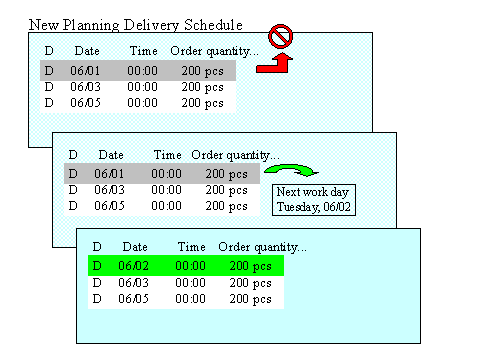
You want to perform a split under the same conditions as in the previous example. The only difference is that you have set the holiday rule to shift quantities.
When the system determines that Monday is a holiday, it attempts to shift this day’s schedule line to the first preceding workday in the same week. Since 06/01 is a Monday, there is no preceding workday. The system then shifts the schedule line to the first following workday, in this case Tuesday, 06/02. The resulting planning delivery schedule has the following daily schedule lines:
Holiday Rule – Divide Quantities
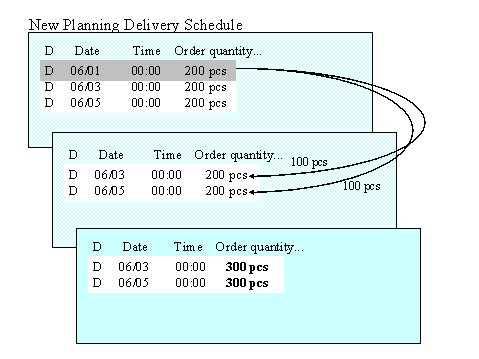
You want to perform a split under the same conditions as in the previous example. The only difference is that you have set the holiday rule to divide quantities.
When the system determines that Monday is a holiday, it divides the schedule line quantity for 06/01 (200 pieces), among the two remaining schedule lines for the week. The resulting planning delivery schedule has the following daily schedule lines: