

 Example: Selection in a Multi-Level BOM
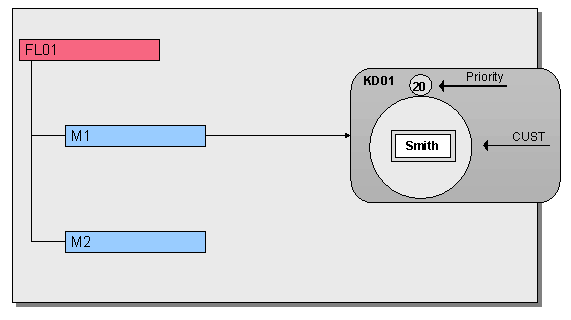
You have created an item containing material M1, in the BOM for material FL01, using change number KD01. KD01 has the CUSTOMER effectivity type. You have assigned the value "Smith" to the CUSTOMER effectivity parameter, in change master record KD01.
You created component 2 without a change number valid from July 1 1999. You do not make an
y changes to this component. Therefore M2 is alw ays valid and effective after 1 June 1999.Single-Level BOM
M1 is an assembly whose items you also create with reference to change master records with parameter effectivity. However, these items have the SERNR (serial number) effectivity type.
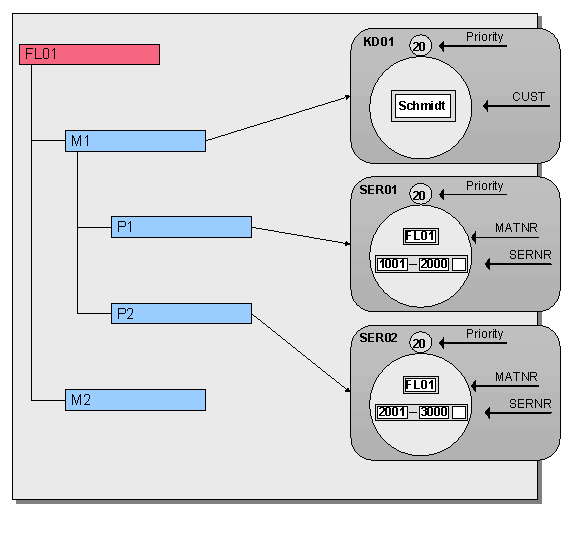
The system only checks the effectivity of items P1 and P2 if the product is assembled for customer "Smith":
You enter the following values:
Effectivity Parameter |
Value |
CUSTOMER |
Smith |
MATNR |
FL01 |
SERNR |
1500 |
You enter the following values:
Effectivity Parameter |
Value |
CUSTOMER |
Jones |
MATNR |
FL01 |
SERNR |
1500 |

