

 Split-Mirror Disk Backup
Use
This section describes how you can use split-mirror disk backup with
BRBACKUP to perform an online or offline backup of your Oracle database without downtime. We recommend this especially for online backup of large databases.
We provide this information on split-mirror disk backup for advice only. Consult your hardware partner for help in setting up split-mirror disk backup.
It is especially important to make sure that the data on the backup database host is consistent when you perform the backup.
Integration
If the backup device is connected to the backup server, you can use the remote device – using
Features
In the split-mirror configuration, the disks of the production database host are mirrored, that is, synchronized. BRBACKUP runs on a backup database host, where the backup is performed after the mirror disks have been split and mounted. On the production host, this saves processing power otherwise required for the backup, so that the production SAP System is unaffected by the backup.
BRBACKUP can be used to control the splitting and later synchronization of the disks. If you want to open the database on the backup host and use it as a "reporting server" you can perform the synchronization yourself later.
The actual splitting and later synchronization of disks is executed by a script or program supplied and supported not by SAP, but by the manufacturer of the operating system, disk subsystem, or backup software.
If the split disks do not have to be resynchronized immediately after the backup you can use the backup server along with the mirror disks to operate an independent SAP System on the backup server. For this you must install the entire Oracle server software on the backup server.
For more information, see the following:
Activities
The following graphic shows how split-mirror backup works:
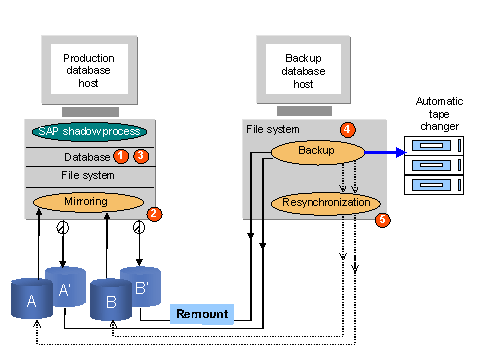
As shown in the above graphic, a split-mirror backup works as follows:
| Split-Mirror Online Backup | Split-Mirror Offline Backup | |
|
1 |
Tablespaces set to status BACKUP |
Production database shut down |
|
2 |
Mirror disks (A' and B' in the graphic) split and |
|
|
3 |
Tablespaces reset to normal status |
Production database restarted |
|
4 |
Mirror disks backed up on backup host |
|
|
5 |
Primary and mirror disks resynchronized using resync_cmd |
|

Consider online split-mirror disk backup if high availability is an important consideration for your system.