 Methods of Absence Quota Accrual
Use
You can use different methods to generate absence quotas for employees, according to company, collective-agreement, or legal requirements.
The methods for automatic calculation of absence entitlements determine this data using the information from your Customizing settings. This means that the time administrators’ workload is reduced noticeably.
You can choose from the following methods:
You create the absence entitlements manually in the Absence Quotas infotype (2006). SAP R/3 automatically calculates default values, which you can accept or overwrite.
This procedure is particularly recommended in the case of hiring a new employee.
· You regularly accrue absence entitlements using the RPTQTA00 report (Generate Absence Quotas). This procedure is particularly recommended if your employees have a predefined entitlement such as 20 days each year.
· You accrue absence entitlements using the QUOTA function in time evaluation.
This procedure is particularly suitable if you determine absence entitlements on the basis of times worked or if you update the entitlement monthly, for example.
In addition to the automatic methods for accruing absence quotas, you can also create absence entitlements manually in the Absence Quotas infotype (2006). If you use one of the previously mentioned methods, you only have to use this, more time-consuming, method if:
· You enter special, infrequently used, absence quotas
· Individual employees have special conditions that would be too complicated to represent in Customizing
Integration
· Online entry of absence quotas in Time Data Recording and Administration (PT-RC)
· Entry of absence quotas in the Hiring action in Personnel Administration (PA-PA)
· Generation of absence quotas during evaluation of time data in Time Evaluation (PT-EV)
Prerequisites
You must have created the necessary prerequisites in Customizing for the generation of absence quotas. For more information, see the Implementation Guide for Personnel Time Management, by choosing Time Data Recording and Administration ® Managing Time Accounts Using Attendance/Absence Quotas ® Calculating Absence Entitlements.
Features
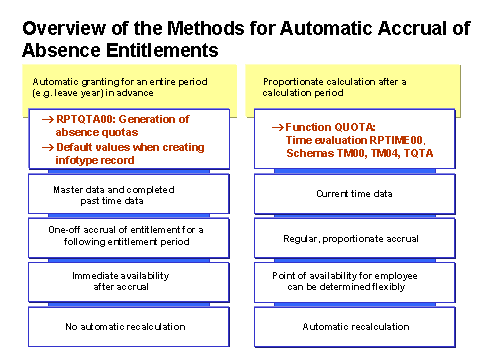
The method that best suits your requirements depends on whether you grant employees absence entitlements in advance or proportionately after a calculation period.
General granting of an absence entitlement in advance
This scenario is used typically for annual leave, which is granted in advance for a calendar year. Employees deduct from this time account over the whole year.
The calculation basis for determining the entitlement is the employee’s master data and age or seniority. If you implement time evaluation, you can also take account of completed time data from the past.

You determine your employees’ annual leave on the basis of organizational or personal data, such as age or seniority.
You determine your employees’ annual leave at the start of each year on the basis of each employee’s time worked in the previous year. You base the calculation on the relationship between productive hours worked and the employee’s planned hours.
You increase an employee’s entitlement to his or her annual leave at the end of each month.
The following methods are available for granting flat-rate entitlements in advance:
...
1. You create the absence entitlements online and use the system’s default values.
When a time administrator enters a record in the Absence Quotas infotype (2006) for an employee, the system proposes the validity period, deduction period, absence quota(s) and entitlements automatically. You can overwrite the values in the infotype at any time.
2. You use the Generate Absence Quotas report (RPTQTA00) to create absence entitlements.
You can use the RPTQTA00 report to generate absence entitlements for groups of employees. If you schedule the report, you can also determine absence entitlements proportionately, for example, for each month. You can overwrite the values in the infotype at any time.
3. You accrue absence entitlements automatically in time evaluation.
Time evaluation can automatically accrue absence entitlements in the regular time evaluation run. The advantage of this method is that the results can be incorporated in a recalculation, which means that any organizational changes are automatically taken into account.
You cannot overwrite the absence entitlements determined by time evaluation. If you need to make corrections, you can use the Quota Corrections infotype (2013).
Proportionate calculation of absence entitlement after expiration of a calculation period
This scenario has the following typical uses:
· Standard leave where the entitlement increases at the end of the payroll period. In this procedure, employees first have to work up absence entitlements, and are not automatically granted flat-rate entitlements.
If an employee has completed the planned hours, he or she receives an absence entitlement of 1.5 days. The entitlement is available for deduction over the following 3 months. If an employee does not work all of the planned hours, the absence entitlement is reduced accordingly.
· Time-off entitlements that employees receive on the basis of overtime worked, for example. In this case, the employees must also work up their absence entitlements.
An employee has worked up 10 hours of time off for overtime. This quota is available at the end of the time evaluation period. He or she can claim it within the following month.
Time evaluation uses the QUOTA function to accrue absence entitlements periodically on the basis of the current time data. Time evaluation calculates an employee’s total entitlement – for example, for each year – proportionately for each calculation period.
The calculation period and the time at which the quota is available to the employee are not related. This allows you to control flexibly the availability of quotas in the Absence Quotas infotype (2006).
If you want to take advantage of time evaluation’s automatic generation function, but do not implement time evaluation, you can use the standard schema TQTA. The schema enables you to represent relatively simple situations such as the proportionate calculation of entitlements per evaluation period, month, or year.
Employees who are evaluated with this schema must be assigned the Time Management status 7 - Time evaluation without payroll integration in the Planned Working Time infotype (0007). For more information, see The Time Management Status.
