Installation
To install CATS notebook, you have to make settings in various areas:
For information on setting up an ITS, see the SAP Library and choose Basis ® Network Integration (BC-NET) ® Network Integration Guide (BC-NET) ® SAP Internet Integration
Publish the offline applications cats_notebook_1_<buildid>.zip, cats_setup_1_<buildid>.zip, and te_basics_1_<buildid>.zip manually on your ITS. Use the following directory structure:
<ITS_MIME_folder>\CATS_NOTEBOOK\99\cats_notebook_1_<buildid>.zip
<ITS_MIME_folder>\CATS_SETUP\99\cats_setup_1_<buildid>.zip
<ITS_MIME_folder>\TE_BASICS\99\ te_basics_1_<buildid>.zip
Replace the character string <IST_MIME_folder> with the subdirectory of the Web server directory, which contains the statistical files. For more information, see
 ITS Directory Structure.
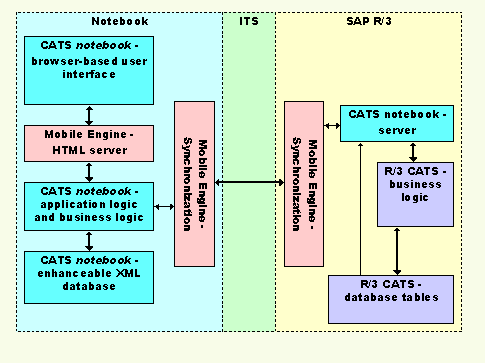
The diagram below shows the system landscape and the data flow between CATS notebook, the Internet Transaction Server, and SAP R/3: