

 System Status Management
Use
The status settings for system status are predefined in the system. You cannot define system statuses in Customizing. A system status can be set in an appropriation request and in each request variant in one of two ways. Either you set the status in the master data of the appropriation request or variant, or the system sets it automatically when certain activities are carried out (for example, creation or approval of an appropriation request).
Features
The following graphic shows the system status settings for appropriation requests:
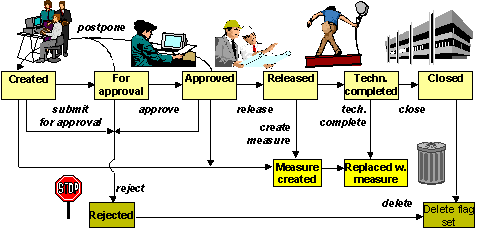
System Status for Appropriation Requests
The system automatically sets created status for the appropriation request when you create it. You have to set for approval status manually. Approved or rejected status can be set either automatically or manually (refer to
Approval of Appropriation Requests ). You have to set released, technically closed and closed status manually. The system automatically sets measure created and replaced with measure status as soon as you create a measure (refer to Conversion to a Measure for Implementation and Planning in the Implementation Phase ).
The status settings released and replaced with measure also have an effect on the measure that belongs to the appropriation request. The measure cannot be released until the appropriation request it belongs to has one of these two statuses.
System Status for Appropriation Request Variants
Appropriation request variants have their own system status.

The actual phases in the life of an appropriation request are managed at the level of the appropriation request header. The status of the appropriation request variant is secondary to this main status, but serves to document the progress of the variant.
The following graphic shows the system status settings for an appropriation request variant:

System Status for Appropriation Request Variants
The system automatically sets created status as soon as you create a variant. You have to set for approval status manually. When you set the appropriation request itself to for approval status, the system automatically requests that you enter the variant to be approved. The system uses the same logic when approved or rejected status is set. The system ensures that only one variant of an appropriation request has for approval or approved status.
The system automatically sets closed status for already approved appropriation requests variants as soon as one of the variants of the appropriation request is approved. If there are no other variants for the appropriation request, the variant keeps its approved status. You have to set lock planning status manually.
The activity planning is not allowed when either lock planning or closed status is set. Planning is allowed for all other status settings. Other than those regarding planning, the system status does not influence any other activities for appropriation request variants. However, you can set up limitations of certain activities using the user status, if you wish (refer to
User Status Management ).