

 SAP Retail Store (LO-SRS)
Use
You can implement this component from the
 SAP Retail system in stores. Together with the central SAP System, this component forms a closed retailing loop.
The majority of transactions and events posted in a store involve procurement, goods movements and sales. SAP Retail Store enables you to have your store associates make these postings directly.
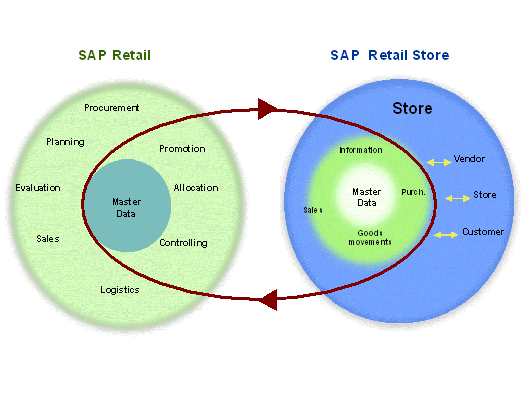
In conjunction with SAP Retail, SAP Retail Store provides the existing equipment for mapping store-oriented processes by offering store personnel both the SAP Retail and the specially developed store retail functions. For this purpose, it has an Internet-based user interface that is tailored precisely to meet the needs of stores. The interface combines the intuitive usability of a web browser with the special transactions of the central SAP Retail system tailored to the needs of the stores. As a result, even part-time staff with little training can quickly start working with the system.
Hardly any administration is necessary when implementing SAP Retail Store in a store, as all that is required is a standard retail PC and browser software.
In addition, there are interfaces for linking PDC devices.
Implementation Considerations
SAP Retail Store is a separate product based on SAP Retail. It is intended for use in small to medium-sized stores with relatively uncomplicated business processes. These stores only require limited SAP Retail functions. Therefore, simplified screens and functions processes for mapping business processes are sufficient.
The system can be used in all kinds of sectors.
By implementing SAP Retail Store, you no longer need a connection to third-party components – except for POS systems - for decentralized store controlling. This is because SAP Retail Store is fully integrated with SAP Retail. A link must exist with the central SAP System while data is being accessed. You should use ISDN lines for communication between stores and the head office.
The screens are easiest to use on a 17" monitor.
The business functions of SAP Retail Store do not support the following browser functions:
You should therefore configure your browser so that the menu bar containing these does not appear. SAP Retail Store enables you to navigate using the graphical elements on the individual screens.
Integration
SAP Retail Store is part of the Distributed Data Processing functions of SAP Retail.
The difference between SAP Retail Store and Online Store is illustrated in the following graphic:
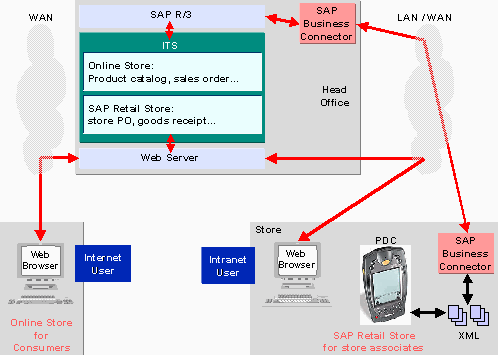
While SAP Retail enables store associates (users with their own R/3 user profile) to map internal business transactions, the Online Store is used to present your merchandise to anonymous customers who may identify themselves as customers via the Internet. See also
Product Catalog and Online Store in the Internet (LO-MD-AM)
SAP Retail Store is run in the head office on an SAP Retail application server and is started by accessing the stores on the SAP System. An Internet Transaction Server (ITS) makes the functions available via Internet Application Components (IACs). It communicates with the SAP System and with the standard Web browsers in the stores using your Intranet or Internet.
PDC devices can easily be linked with the system using a file exchange procedure via the file system in the browser PC. However, the option that is easiest to use is PDC linking using RFC interfaces. You can use the SAP Business Connector as detailed above for data communication between the PDC device and the SAP System. The software for formatting and processing data on PDCs is not part of SAP Retail Store. SAP partner companies offer it as a certified solution. For more information on installing and operating this PDC software, refer to the documentation relating to the particular solution you are using.
If you use the procedure with RFC interfaces, refer to the documentation in
Background Processing: PDC Link in SAP Retail Store.
Features
Before you can access the SAP Retail Store menu, you have to log on the initial screen. Both screens are required for navigating and working with general parameters (such as store numbers).
The system checks authorizations at store and transaction level.
The user interface in SAP Retail Store is intentionally kept very simple thanks to the easy usability of the dialog boxes. This way, the store personnel can quickly learn how to use the system for every day work.
Automatic data enhancement functions ensure the system is tailored to use in the store. For example, in most functions, it is not necessary to enter organizational data.
All the functions available in SAP Retail Store can be accessed from a graphical menu. You do not have to use all the functions available every time. SAP Retail Store enables you to display only those functions in the menu that you want to use in your stores.
Even with only a little knowledge of HTML, you can change the interface as required. You can, for example, add your own graphics or include links to additional pages, change specific columns or even replace the SAP Retail Store logo with your own. You can also change the Customizing settings in the SAP System and suppress individual fields.