

 Part 3 - Chaining a Series of Transactions
Use
The first transaction that you recorded, Create Vendor (FK01), creates a customer record. Another transaction, Change Vendor (FK02), allows you to modify an exiting customer record. In this transaction, you will edit the address in a customer record that you created earlier.
You can chain these transactions together so that when you create a customer record, the record is automatically passed to the second transaction for modification. To do this, you need to define the Vendor number as an export parameter in the first transaction, and as an import parameter in the second transaction. The Vendor number is passed between the transactions as a local variable.
Prerequisites
You have recorded transaction Create Vendor (FK01) and edited the test script as described in parts 1 and 2 of this tutorial.
Procedure
Recording Transaction FK02 and Creating an Import Parameter
 log that was generated when you created the vendor.
 .
. .
. A dialog box appears.
 .
. , to go back to the script editor.
The import parameter has been automatically entered in the structure editor.
 to display parameters. The input parameter appears automatically. It has value I in the Visibility of Parameter I/E/V field. If it is not visible choose
  to refresh the list.
Creating an Export Parameter
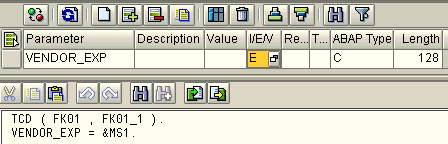
You have seen that transaction FK01 issues a message containing the vendor number and company code. You can use the first variable part of the message, which contains the vendor number, to provide the value for an export parameter.
to display parameters. There are no parameters defined yet. .
.
 .
.Calling Scripts from Another Script and Passing Values
.In the Interface field, a system-generated name appears.
.The following appears in the command editor:
REF ( XYZ_FK01 , XYZ_FK01_1 ).
REF ( XYZ_FK01 , XYZ_FK01_1 ).
REF ( XYZ_FK02 , XYZ_FK02_1 ).
to display parameters. There are no parameters defined yet..

Result
You have generated a new vendor record and automatically altered it.