Filter-Dependent Business Add-Ins
Business Add-Ins may be implemented depending on a specific filter value. If the standard allows for an enhancement for, for example, country-specific versions, it is likely that various partners will want to implement this enhancement Distinct implementations can then be created and activated according to country.
Enter a filter type when defining your enhancement (a country or industry sector, for example). All methods created in the enhancement's interface have filter value 'FLT_VAL' as their import parameter. The application program provides the filter value to the enhancement method. The method then selects the active implementation for that value.
A description follows of how a filter-dependent Business Add-In works in the context of the string conversion example. In the following example, different implementations will be called using different filter values.
Defining a Filter-Dependent Business Add-In
To define a filter-dependent Business Add-In, first create a normal Business Add-In and select the Filter checkbox.

Enter the data element you want as a filter type or select a filter type using the possible entries help.
A filter type can be a data element or a structure. A data element must fulfill the following criteria:
If need be, you can create such data elements yourself.
If you want to call the implementation of a Business Add-In depending not only on one filter value but on various values, you can enter the name of a structure into the Filter type field. The structure can consist of several data elements that fulfull the above conditions for data elements.
Now create an interface with a method. Be aware that for each method you create in the interface of a filter-dependent enhancement, the appropriate filter value must be defined as the import parameter so that the application program can provide the filter value to the enhancement method. The method then selects the active implementation for that value.
The filter value is declared using parameter flt_val and is preset in the list of parameters.

Calling a Filter-Dependent Business Add-In from an Application Program
As previously discussed, application developers create an instance of the generated class in their application programs and call the corresponding method at the appropriate time. The filter value is passed to the method as export parameter.
Report businessaddin.
class cl_exithandler definition load.
data flt type usa_land.
data exit type ref to if_ex_businessaddin.
data word(15) type c value 'Business Add-in'.
start-of-selection.
perform formatlist.
call method cl_exithandler=>get_instance
changing instance = exit.
write:/'Please click here'.
at line-selection.
new-page.
write:/ 'Original word: ',word.
call method exit->method
exporting
flt_val = flt.
Changing
parameter = word.
write:/ 'Changed word: ',word.
The subroutine formatlist looks like this:
form formatlist.
write:/'USA -> Conversion to upper case'.
flt = 'USA'.
hide flt.
write :/'Ireland -> Conversion to lower case'.
flt = 'Ireland'
hide flt.
write :/'Italy -> Conversion to...'
flt = 'Italy'.
hide flt.
endform.
Implementing a Filter-Dependent Business Add-In
If you want to use a filter-dependent Business Add-In, you will need an implementation for each relevant filter value. Multiple filter values may use the same implementation, however.
When implementing a filter-dependent Business Add-In, proceed as follows:
In the string conversion example, you would make the following entries for each country:
BRD:
Ireland:
Italy:
Now, whenever you execute the report program described above, different country-specific implementations are executed.
You can specify generic filter values for the implementation of a Business Add-In, which means that you can use the special character "*". You can use the asterisk to represent any part of a filter value. A generic filter value can be replaced by different values which may be found in the database.
You can show and hide short texts for filter values by double-clicking the corresponding column.
As far as extendible filter types are concerned, it is also possible to edit short texts.
Extendible Filter Types
If you flag a filter type as being extendible, it is also possible to create implementations for filter values that did not exist so far. When you assign the extendible attribute to a filter type, the Implementation menu option in the BAdI Builder is replaced by Filter value. If you choose Filter value ® Create and enter a filter value that did not yet exist (you do not need to specify the name of the implementation), the system takes you to the transaction for implementing Business Add-Ins. You can also use transaction SE19, as usual.
Note that the assignment of the extendible attribute is subject to the following restrictions:
The domain to which the extendible filter type refers must have the following properties:
All filter values that are created in the context of an extendible filter-dependent Business Add-In must not yet occur in the value table and are added to the value table when the data is saved. Analogously, the values are removed from the value table when the implementation or the entire Business Add-In is deleted. The same applies to the text table.
Special Characteristics of Country-Specific Business Add-Ins
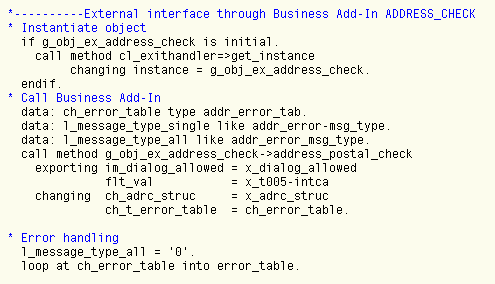
The standard system contains a Business Add-In which provides an interface for integrating additional postal checks of the address data through external tools. This Business Add-In is called Address-Check.
This example uses the data element INTCA (ISO code of the country). Since SAP recommends complying with the international ISO standard for country-specific queries, you should use the data element INTCA also for Business Add-Ins. The ISO code of a country key would be, for example, US instead of USA, or DE instead of BRD.
Before the Business Add-In is called from within the application program, you must determine the ISO code of the country by submitting a SELECT statement against table T005 (field INTCA). Then you can pass the filter value as exporting parameter.