

 Switching Off the Phantom Assembly
Standard Explosion for Phantom Assembly
If the material master record of a BOM header material contains the special procurement key Phantom assembly (value 50 in the standard R/3 System), dependent requirements are generated for components of the phantom assembly, and planned orders or purchase requisitions are created only for these components.

In the material master of material B, Phantom assembly is set in the Special procurement field.
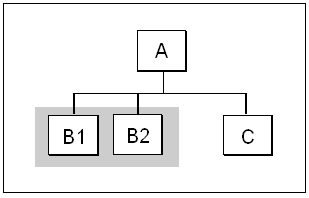
Material B is a material component in a BOM and has item number 0010. It also has a BOM of its own, containing components B1 and B2.
In the standard system, dependent requirements are generated for components B1 and B2 when the BOM is exploded in MRP.
The following graphic shows how a BOM that contains a phantom assembly is exploded for production. The phantom assembly (component B) is ignored. Only the components of the phantom assembly (components B1 and B2) are read.
Using the Explosion Type to Explode a Phantom Assembly
You can define an explosion type that generates dependent requirements for materials that have the Phantom assembly special procurement key.
To do this:
In Customizing, explosion type A is defined so that the Phantom assembly off indicator is set.
Material B is a material component in a BOM. It also has a BOM of its own, with components B1 and B2.
The following graphic shows how a BOM that contains a phantom assembly (component B) is exploded. The explosion type is set to Phantom assembly off. This means that material B is included in the planning run.
