

 Creating Namespace Folders
Use
In some cases, it can be necessary to create a namespace folder for the MIME Repository (MR) Browser explicitly. For example, it can happen that you wish to assign certain MIME objects in the MR Browser to a special namespace; the required namespace, however, is not contained in the selection list of the MR Browser.

A namespace folder is created implicitly in the MR Browser whenever a BSP application has already been created in the corresponding namespace. See also
Prerequisites
Only those namespace folders that have already been predefined by the system can be created. Their IDs are therefore derived from the F4 help as described below (see step 4).
Procedure
To create a namespace folder in the MIME Repository Browser, proceed as follows:
The MIME Repository Browser displays the standard namespace folder.
 Create Namespace Folder.
 The Create Namespace Folder dialog box appears.
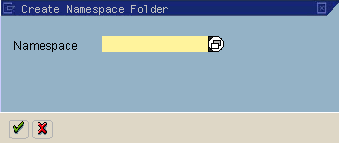
 .
. The system then displays the Create Object Catalog Entry dialog box.
 Save.
Save.Result
The appropriate entry for the namespace is included in the selection list in the MIME Repository Browser. All MIMEs that belong to this namespace can now be displayed in the browser folder with the same name.