Stateful or Stateless Programming?
As described in
 Stateless and Stateful Model, the underlying framework supports both stateful (user context in SAP System is maintained) and stateless (user context is terminated and regenerated for every request) modes.
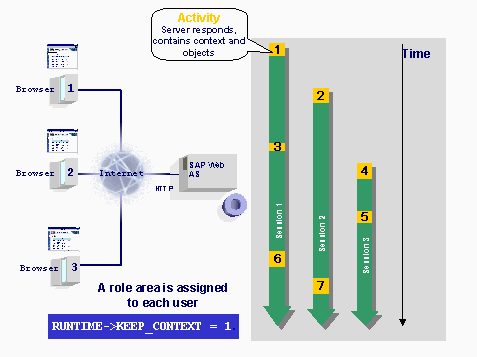
This process is represented in the following graphic:
In stateless mode, the process looks like this:
The numbers indicate which user performs each action. The time progression clarifies the sequence of events.
When Should Stateful Mode Be Used?
When developing a BSP application, you should weigh up the advantages and disadvantages of stateful and stateless modes.
If a status needs to be maintained over a number of pages (for example, items in a shopping basket), stateful mode or the use of client-side cookies is advisable. If the application is working with stateful mode, the user context must not be kept over the entire flow logic of the BSP application. Alternatively, stateful mode could just be implemented for the length of time the status needs to be retained. It can be switched at any time to stateless by using the command
RUNTIME->KEEP_CONTEXT = 0.Stateless mode is more suitable for applications that do not require any status information, as this mode avoids unnecessary use of SAP System resources.
How to Set the Mode
When a BSP application is created, this mode can be set by accessing the
runtime object dynamically or in the development environment for the whole BSP application.This is described in the section
Setting Stateful or Stateless Mode.Stateful means that the
Object Application, specified by the application class is retained (see also Application Class of BSP Application). In stateless mode, the object is reset.This is demonstrated in the example below: