

 SAPGUI Command Interface
This example illustrates the main features of the SAPGUI command interface.
Header Data

If the ResetGUI contains 'X', the transaction specified in ProcessedScreen[1] will be started anew. Where several transactions have been recorded, set the ResetGUI flag in the first SAPGUI command following each change of transaction.
ConnectionID and SessionID uniquely identify the sessions during replay. When everything should run in the one session, all the SAPGUI command interfaces must have the same SessionID and ConnectionID.
SystemInfo is only for logging purposes. It is overwritten during replay.
ProcessedScreen Node

Active.
Transaction contains the transaction code.
Program contains the program name.
ScreenNumber contains the screen number.
InitialState contains the recorded initial states of the GUI elements.
Message contains the recorded messages.
UserChangedState contains the changes, made by the user, to the state of the GUI elements.
UserChangedState Node
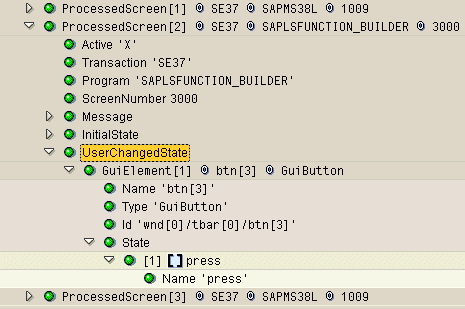
If you want a field to be available for parameterization in the command interface, you must edit it during recording.
Message Node

If AsPopup contains 'X', the message is a popup.
Messages can be handled by enclosing SAPGUI commands in an MESSAGE…ENDMESSAGE block.
InitialState Node

The complete hierarchy of GUI elements down to the element to be checked is shown in the InitialState node. At each level there is a Check node where you can turn on ('X' ) or off the checks for all underlying GUI elements.
You can parameterize CheckValue.
In the log, the actual value of the GUI element appears beside the Value node.