

 Connection to SAP Business Information Warehouse
Use
If you can use the SAP Business Information Warehouse (SAP BW) as a databank, it can also be used in conjunction with MAP. All the advantages of SAP BW are available to you.
SAP BW allows you to:
Prerequisites
Your MAP system must fulfill the following criteria before you can use SAP BW to read actual data:
System landscape
The following graphic illustrates a possible system landscape when MAP is linked to SAP BW:
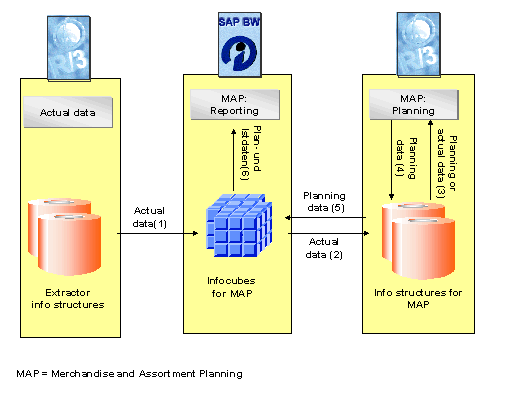
Explanation of the different data flows:
(1) The actual data infocubes in MAP are filled with actual data from existing extractor info structures in R/3.
(2) The actual data for the MAP info structures is taken from the actual data infocubes.
(3) The planning data or actual data is taken from the info structures.
(4) The planning data is stored in info structures.
(5) The planning data for the planning data infocube in MAP is taken from the info structures.
(6) The planning data infocubes and actual data infocubes can be used for reporting.
Combining a BW System with an R/3 System
The following table indicates which functions are available for which system combination:
Function |
BW System |
R/3 System |
Read actual data from BW (2) |
as of Release 2.0A |
as of Release 4.6C |
Read planning data to BW (5), |
- |
as of Release 4.6B |
Best Practice Content in BW + R/3 |
as of Release 2.0B |
as of Release 4.6C |
Business Content
Business Content are pre-configured information models in SAP BW. The Business Content should be used as a template or example if you want to create your own Business Content.
Business Content especially for MAP is to be included in SAP BW. The Business Content will be based on Best Practice Scenario 1_SAP. The main characteristics: