

 Field Dependencies
Use
Field dependencies specify the relationships between the fields in a dialog. The dependency of a view/table field is usually limited to a field in the higher-level dialog.

If all foreign key relationships for all dialogs are correctly maintained in the ABAP/4 Dictionary, the field dependencies can be generated.
Functions
Maintain the following fields:

Assign the view definition maintenance attribute S to key fields which depend on their predecessor. The restrictions from the predecessor of the selected entry are displayed in the maintenance screen header. When you create new entries, the key fields are filled according to these restrictions.
Additional information about dependency types
There are three other possible values S, I and C, as well as the default value, with which you can specify field dependencies to use special view cluster maintenance functions.
The field is filled from the higher-level view cluster dialog when you go to the dialog.

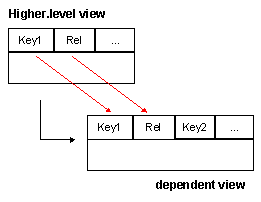
The field dependency S between the fields Rel of the higher-level and dependent views fills the value of Rel for Key1 in the dependent view from the higher-level view:
The field dependency C performs a foreign key check for fields which are not hierarchically dependent on each other. The foreign key check is made against the internal data status, not the saved data status in the database as in the screen processor.

The subset condition is only checked once.
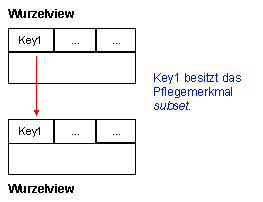

A field dependence of type <space> must exist for each view/table. For root dialogs, enter the following:
You must make an entry of type <space> for each lower-level dialog key field which has a (foreign) key relationship to a key field in the higher-level dialog.
Additional information about subset fields
If a dependent dialog contains key fields which are defined in the ABAP/4 Dictionary as subset fields, but have no relationship to the predecessor, distinguish the following cases:
If the value has not been entered, you are prompted for it the first time that you go to the dialog. The hierarchical operations take into account all dependent entries read, regardless of this value.
Hierarchical operations take account of all dependent entries regardless of the subset field, if events