
 Internet Communication Manager (ICM)
Uses
The Internet Communication Manager ensures communication between the SAP system (SAP Web Application Server) with the outside world using the HTTP, HTTPS and SMTP protocols. In the server role, it can process requests from the Internet that have URLs with the server/port combination which the ICM responds to. Independently of the URL, the ICM then calls the corresponding local handlers. This is described for HTTP under
HTTP Plug-In.
Introductory Comments
You need the ICM if you want your SAP Web AS to communicate with the Internet using HTTP(S), SMTP or NNTP.
Integration
The ICM is part of the SAP Web AS. The ICM is implemented as an independent process, and is started and monitored by the dispatcher. You can use profile parameters to set whether the ICM should be started and how it should be configured (see also
Parameterization of the ICM and the ICM Server Cache).
Functions
The ICM process uses threads to parallel process the load.
The following illustration shows a detailed overview of the ICM.

This illustration concentrates on the server role. For information on the client role see
Client Role.
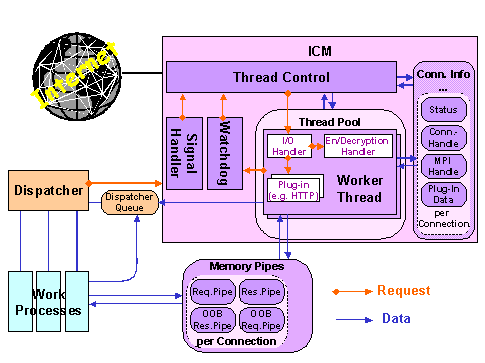
Besides the pool of worker threads, which process incoming requests, the following ICM components are also implemented as threads:
- Thread Control
:
This thread accepts incoming TCP/IP requests and creates (or calls) a worker thread from the thread pool to process the request. From this point on, thread control initializes the connection info data.
- Worker Threads
:
These threads handle requests and responses for a connection. A worker thread contains an I/O handler for network input and output, and various plug-ins for the different protocols supported by the system (HTTP, SMTP, and so on). The plug-ins decide when a sent packet is complete (this process is protocol-dependent).
- Watchdog
:
Usually, a worker thread waits for the response, regardless of whether the worker thread is a server or a client. If a timeout occurs, the watchdog takes on the task of waiting for the response. This makes the worker thread available for other requests. When the watchdog receives the response, it informs the thread control components, which then call a worker thread.
- Signal Handler
:
This thread processes signals sent from the operating system or from another process (for example, the dispatcher).
- Connection Info
:
This table contains information about the state of the connection, the memory pipes, and the plug-in data for every existing network connection.
- Memory Pipes
:
Memory pipes are memory-based communication objects that handle data transfer between the ICM and the work processes. There are four pipes for every connection: one data pipe per request and response and one out-of-band (OOP) pipe. The OOP pipe is used for control information.
ICM Plug-Ins
The ICM contains plug-ins for the protocol-dependent tasks. The Internet protocols HTTP and SMTP each have a plug-in. The plug-ins perform the following tasks:
- All protocol-specific tasks
- Input and output data handling, data manipulation
- Local handling in the ICM or forwarding to the work process
The HTTP plug-in is described in more detail in
HTTP Plug-In.
See also:
Logging in the ICM
Binding Ports < 1024 on UNIX
Internet Server Cache
Parameterization of the ICM and the ICM Server Cache
Monitoring the ICM with the ICM Monitor
SAP Web Dispatcher
Integration of the SAP J2EE Application Server