

 Monitoring and Administrating the ICM Server Cache
Use
To monitor the ICM Server Cache, choose Go To ® Server Cache. The following functions are available.
Prerequisites
The ICM is running on the application server.
The
ICM Server Cache has been correctly configured.Functions
Display ICM Server Cache Content
Displays all objects currently contained in the cache. The following details are given for each object:
You can search the list, sort the items in the list, double-click an object to display it in the lower window, and display and invalidate individual cache entries. To invalidate an entry, position your cursor on the entry and choose  .
.
See below for details of how to invalidate all entries in the cache.
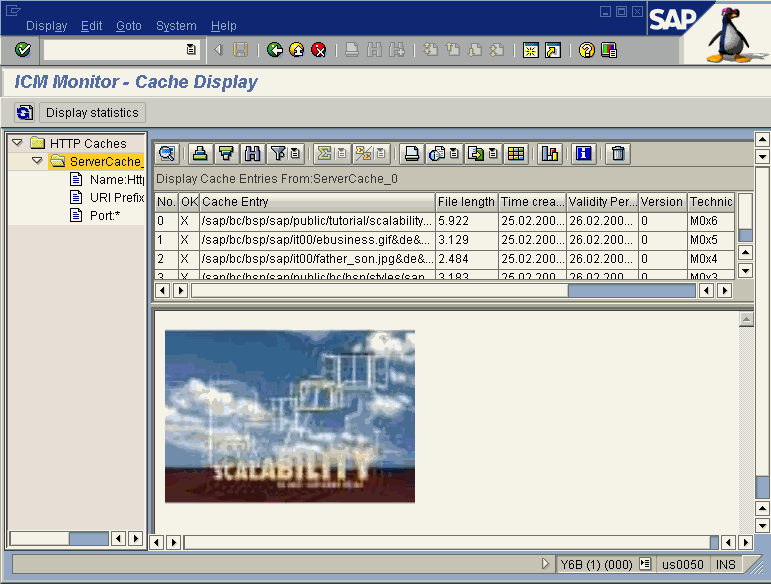
The left-hand frame in the picture above shows the various server caches that were defined using parameter
icm/HTTP/server_cache_<xx>, as well as their URLs and port numbers.Display ICM Server Cache Statistics
The statistics provide information such as the size of the cache, how much cache memory is in use, the total number of cache accesses, and so on.
To display the statistics, choose Go To ® Display Statistics.
Invalidate ICM Server Cache
You can invalidate all entries in the cache. This is possible both for the local server and the entire system. To do this, choose Edit ® Invalidate Cache. Then choose either Only local or Globally in system.
See also:
ICM Server Cache